Short answer: usually a few business days to about two weeks. Twilio quotes 3 to 5 business days, Telnyx says 5 business days or less, and Plivo says up to two weeks. If you are using Azure or AWS, budget much more time, because their published ranges stretch from 15 business days to six weeks.
The frustrating part is that every source seems to give a different number. This article pulls the reported timelines provider by provider, explains why they conflict, and tells you what actually moves the needle on speed.
Volatility warning: every figure below comes from a provider help center, doc page, or credible community report observed on 2026-09-28. Carrier queue depth changes with volume, and providers revise their docs without notice. Telnyx even publishes two different timelines on two different pages. Treat everything here as a planning estimate, not a promise, and confirm the current figure in your provider’s docs before you commit to a launch date.
This is general information, not legal advice. Carrier rules and registration requirements change, so verify the current requirements against official sources before you submit anything.
Toll-Free Verification Timelines by Provider
Here is what each provider actually publishes, with the conflicts left in so you can see the full picture.
| Provider | Reported timeline | Source | Notes |
|---|---|---|---|
| Twilio | 3 to 5 business days | Twilio help center | Verification itself is free |
| Telnyx | 5 business days or less | Telnyx verification request guide | Says speed varies with request volume |
| Telnyx | 2 weeks currently, expected to drop to 1 week | Telnyx toll-free messaging doc | Directly conflicts with the guide above |
| Telnyx | 1 to 3 days in practice | Community report | One developer’s real turnaround |
| Plivo | Up to 2 weeks | Plivo blog | Recommends not sending until verified |
| Plivo | 4 to 6 weeks for verification beyond certain sending limits | Plivo docs | Appears to cover high-volume cases |
| Bandwidth | 5 business days expected time to market | Bandwidth glossary | AI-assisted registration tools “often” cut this to 2 to 3 business days |
| Omnisend | Around 5 business days, up to 2 weeks in some cases | Omnisend blog | – |
| Infobip | 1 to 2 weeks | Infobip docs | – |
| AWS End User Messaging | Up to 15 business days | AWS docs | Slowest of the mainstream CPaaS group |
| Azure Communication Services | 5 to 6 weeks | Microsoft Learn | Doc page is dated; recheck before planning |
| Third-party summaries | 1 to 7 business days | Comparison sites | These blend multiple providers into one range |
Notice the pattern. The providers that handle verification in-house and talk directly to the aggregator (Twilio, Telnyx, Bandwidth, Plivo) cluster around days. The cloud platforms that route requests through extra layers (AWS, Azure) run into weeks. Infobip and Omnisend sit in the middle.
Why the Numbers Conflict
The conflicting figures reflect four real differences in what each source is measuring.
First, the review has two stages. Your provider reviews your submission first, then it goes to the toll-free messaging aggregator and the carriers for final approval. A provider quoting “3 to 5 business days” may be describing its own review plus a typical aggregator queue, while another source quotes only the carrier stage. Telnyx’s two pages make this visible: the request guide gives the normal end-to-end range, while the messaging doc’s note about 2-week approval times reflects a period of heavier queue depth.
Second, queue depth moves. Telnyx’s guide says approvals are “normally 5 business days or less but can be faster or slower depending on volume of requests received.” When submission volume spikes, everyone’s wait gets longer and the published averages lag behind reality. A figure from a help-center page updated months ago may not match what applicants see this week.
Third, “expected time to market” is not the same as approval time. Bandwidth’s 5 business days is framed as time to market, which folds in number provisioning and setup alongside the review. That is useful for planning, but it is a different measurement than a pure approval clock.
Fourth, some pages are simply old. The Microsoft Learn page quoting five to six weeks for Azure last saw a meaningful update years ago, so that range may reflect an older, slower process. Treat stale docs with extra skepticism and look for the page’s last-updated date before you trust the number.
The honest bottom line: plan for the slowest credible figure for your provider, and treat anything faster as a bonus.
What Speeds Up (or Slows Down) Verification
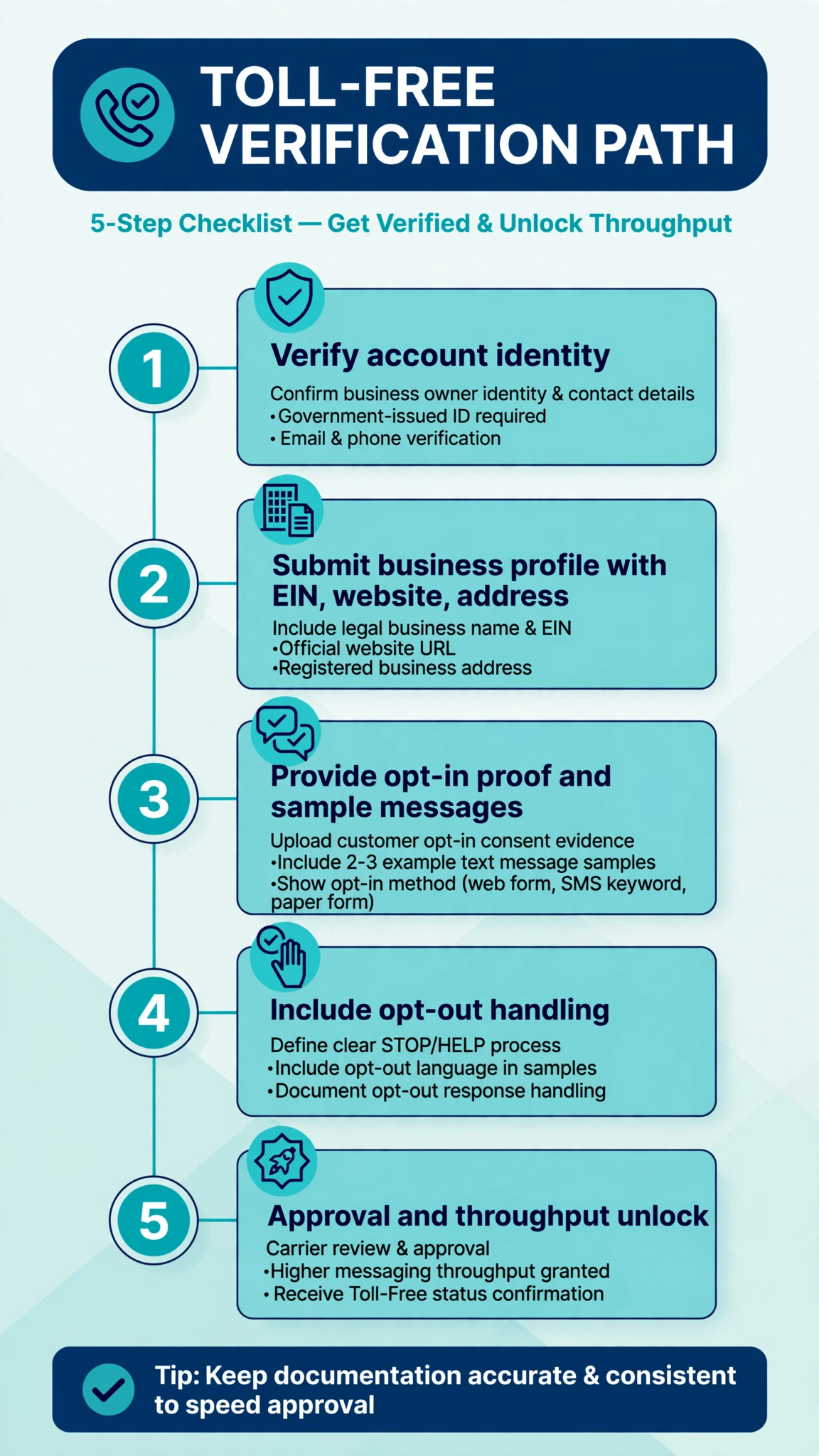
There is no official expedited lane. No provider in this research publishes a rush option for toll-free verification, and verification is free on Twilio and Plivo, so anyone selling you “expedited toll-free approval” for a fee is not selling you anything real. The only speed lever you control is submitting a complete, correct application the first time. Rejections restart the clock, and on Telnyx a resubmission even overwrites an existing approval until the new request is approved, so careless edits have a real cost.
These are the factors that matter most.
Opt-in proof is the biggest one
Microsoft’s own guidelines call the opt-in section the most crucial step in the application. If your opt-in URL is missing, inaccessible, or the opt-in process is unclear, the application gets rejected. You need to show how people consented to receive messages: a form screenshot, the exact disclosure language shown at signup, and confirmation that marketing content is optional where required. One developer’s walkthrough of a Twilio approval describes getting rejected with “Error 30489: Website Must Be Established and Active,” then passing after building a real multi-page site with a working opt-in form, a privacy policy, terms pages, and an unchecked consent checkbox stating message frequency and STOP instructions.
Your website has to look real
The same rejection pattern shows up repeatedly. A single thin page thrown up to satisfy the form gets rejected. Carriers want to see an established, active website: real pages, real navigation, a privacy policy that addresses how mobile numbers are handled, and terms of service. This is the step most technical founders underestimate, and it is where the biggest avoidable delays come from.
Details must match across the application
Business name, website, and contact details should line up. Mismatches between your legal business name and what appears on your site or your provider account invite extra scrutiny and back-and-forth that adds days.
Your use case and message samples must be clear
Toll-free review is anti-spam focused. Plivo’s docs note that spam filters on toll-free are tuned to block unwanted bulk marketing campaigns, which means marketing-heavy use cases get closer inspection. Write a plain description of who receives the messages, how often, and why. Include sample messages that match your actual use case exactly, not generic placeholders.
Aggregator queue volume
This one you cannot control, but you should know about it. Telnyx states approval times move with request volume. Holiday seasons and regulatory deadlines create submission surges. If your launch date is fixed, submit two to three weeks before you need to send, even if your provider quotes five days.
Can You Send Messages While You Wait?
No. Since January 31, 2024, the industry toll-free aggregator disallows sending on non-verified toll-free numbers. Unverified traffic gets blocked outright. Infobip returns error 488 for unverified numbers, and Twilio blocks with its own error codes. You can buy the number and build your integration while the review runs, but no A2P messages to US numbers will deliver until verification completes. Build this into your project plan: verification is on the critical path, not a background task.
FAQ
How long does toll-free verification take on Twilio?
Twilio’s help center quotes 3 to 5 business days. Real-world reports range from same-day approvals to the full five days, and one developer reported approval in minutes once a website issue was fixed. Plan for five business days and submit early.
How long does toll-free verification take on Telnyx?
Telnyx’s verification request guide says 5 business days or less, varying with request volume. A separate Telnyx support note says current use-case approval times are 2 weeks, with an expected improvement to 1 week. One community report described a 1 to 3 day turnaround. The honest range to plan around is one to two weeks.
Can I expedite toll-free SMS verification?
No provider offers an official expedited option, because the final review sits with the toll-free aggregator and the carriers rather than your provider. The fastest legitimate path is a complete first submission with working opt-in proof and an established website.
What happens if my toll-free verification is rejected?
You fix the flagged issue and resubmit, and the clock restarts from zero. Rejections almost always come with a reason, such as missing opt-in proof or an incomplete website. On Telnyx, be careful: submitting a new request for an already approved number overwrites the approval, and the number stays unverified until the new request is approved.
Can I send texts while waiting for toll-free verification?
No. Unverified toll-free numbers cannot send A2P SMS to US recipients. Messages get blocked by the provider or the aggregator, and the industry-wide block on unverified sends has been in force since January 31, 2024. Set up your number, build your integration, and test everything except live sending while the review runs.
Does toll-free verification cost anything?
Twilio and Plivo both state that toll-free verification itself is free. You still pay for the number rental and per-message rates, but the review carries no fee. That is one more reason to be suspicious of anyone charging for “expedited verification.”
How long does Plivo toll-free verification take?
Plivo’s blog says the process can take up to two weeks, while Plivo’s docs mention 4 to 6 weeks for verification beyond certain sending limits, which appears to cover higher-volume cases. For a standard low-volume application, two weeks is the safe planning number.
Is toll-free verification faster than 10DLC?
Usually, yes. Twilio quotes 3 to 5 business days for toll-free verification, while 10DLC campaign vetting can take longer, especially when external vetting is required, which is why many teams use toll-free as the faster path for notifications, support, and verification use cases. The tradeoff is throughput: toll-free starts around 3 messages per second per number, while 10DLC campaigns scale much higher.
Conclusion
Toll-free verification takes anywhere from a few business days to several weeks depending on your provider and the carrier queue. For most senders on Twilio, Telnyx, Plivo, or Bandwidth, the realistic planning range is one to two weeks, with faster approvals common when the application is complete. AWS and Azure users should budget longer.
The pattern across every source is the same: the quoted timeline is only as good as your submission. Working opt-in proof, a real website with privacy and terms pages, and sample messages that match your actual use case are what separate the three-day approvals from the three-week ones. Submit early, get the paperwork right the first time, and do not schedule a launch that depends on a best-case timeline.
Want this set up for you?
I build SMS chatbots and API integrations for businesses. If you would like what this guide describes, done for you, get in touch.