
Before chatbots got smart, they got useful. The SMS keyword autoresponder is the workhorse of text messaging: someone texts JOIN and gets a signup confirmation, texts HOURS and gets opening times, texts INFO and gets a description. No AI, no ambiguity, no per-message model cost. It answers in under a second, it never hallucinates, and it is still the right tool for a huge number of real businesses.
In this tutorial you will build a complete keyword autoresponder with Twilio and Python: case-insensitive keyword matching, a JOIN flow with double opt-in confirmation, HELP and STOP handling, and a default fallback that teaches the user the available keywords instead of going silent.
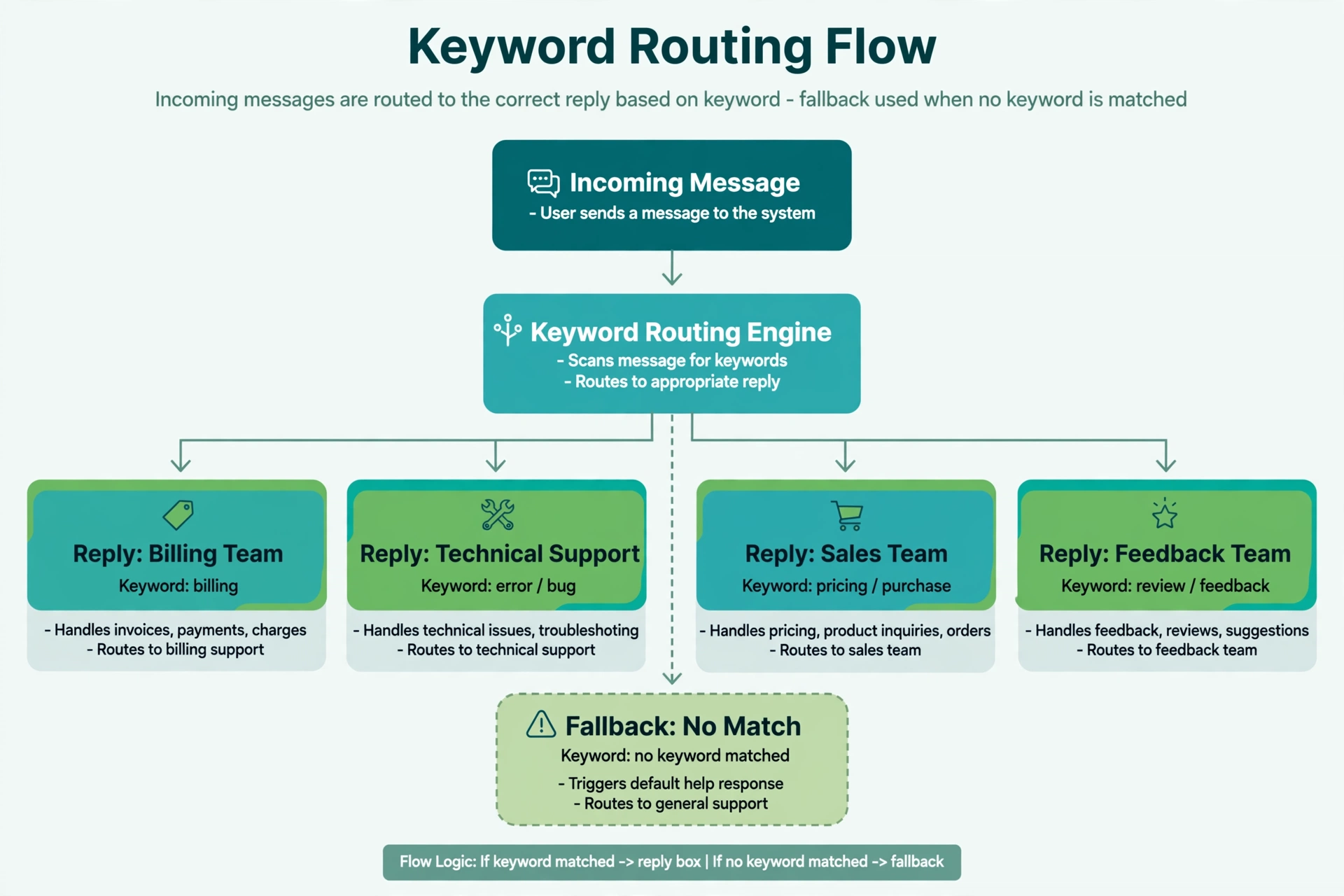
Why keywords still win for many use cases
A language model is wonderful for open-ended questions, but it is overkill when the question set is small and the answers are fixed. Keyword autoresponders have four durable advantages: they are instant, they cost nothing per message beyond carrier fees, their replies are legally reviewable word for word, and they work identically in every country without prompt tuning. Most production SMS programs use keywords as the front door and add AI only where the keyword list runs out.
Step 1: Set up the project
mkdir keyword-bot && cd keyword-bot
python -m venv venv
source venv/bin/activate
pip install twilio flask python-dotenv
.env file with your Twilio credentials:
TWILIO_ACCOUNT_SID=ACxxxxxxxxxxxxxxxxxxxxxxxxxxxxxxxx
TWILIO_AUTH_TOKEN=your_auth_token_here
TWILIO_PHONE_NUMBER=+15551234567
Step 2: Design the keyword map
Good keyword design is a product decision before it is a code decision. Pick short, obvious, single-word keywords. Advertise exactly the keywords you support, everywhere the number appears: on signage, on your website, in the welcome text. A keyword nobody knows about is a dead feature.
This bot supports:
| Keyword | Purpose |
|---|---|
| JOIN | Start the signup flow (with confirmation) |
| YES | Confirm the signup (double opt-in) |
| INFO | What the business does |
| HOURS | Opening hours |
| LOCATION | Address and directions |
| DEALS | Current promotion |
| HELP | List available keywords |
| STOP | Opt out |
Step 3: Write the autoresponder
Create app.py:
import os
from flask import Flask, request, Response, abort
from twilio.twiml.messaging_response import MessagingResponse
from twilio.request_validator import RequestValidator
from dotenv import load_dotenv

load_dotenv()

app = Flask(__name__)
validator = RequestValidator(os.environ["TWILIO_AUTH_TOKEN"])

OPT_OUT = {"stop", "stopall", "unsubscribe", "cancel", "end", "quit"}

KEYWORD_REPLIES = {
    "info": (
        "Green Grocer is a neighborhood market with fresh produce daily. "
        "Reply HOURS, LOCATION, or DEALS."
    ),
    "hours": "Open Monday to Saturday, 8am to 8pm. Closed Sundays.",
    "location": "Find us at 456 Oak Avenue, next to the library.",
    "deals": "This week: 20 percent off all berries. Show this text at checkout.",
}

HELP_TEXT = (
    "Text JOIN to get weekly deals, INFO to learn about us, HOURS for "
    "opening times, LOCATION for directions. Text STOP to opt out."
)

JOIN_PROMPT = (
    "Reply YES to confirm you want weekly deals texts (max 2 per week). "
    "Text STOP to opt out anytime."
)

JOIN_CONFIRMED = (
    "You are signed up for weekly deals. Text STOP to opt out anytime."
)


def twiml_reply(text: str) -> Response:
    resp = MessagingResponse()
    resp.message(text)
    return Response(str(resp), mimetype="text/xml")


@app.route("/sms", methods=["POST"])
def sms_webhook():
    signature = request.headers.get("X-Twilio-Signature", "")
    if not validator.validate(request.url, request.form, signature):
        abort(403)

    raw = request.form.get("Body", "").strip()
    keyword = raw.lower()
    sender = request.form.get("From", "")

    # 1. Opt-out always wins
    if keyword in OPT_OUT:
        # TODO: mark sender as opted out in your database
        return twiml_reply("You have been unsubscribed. No further texts will be sent.")

    # 2. JOIN starts a double opt-in: require YES before subscribing
    if keyword == "join":
        # TODO: record a pending signup for sender
        return twiml_reply(JOIN_PROMPT)

    if keyword in ("yes", "start"):
        # TODO: confirm sender has a pending signup, then subscribe them
        return twiml_reply(JOIN_CONFIRMED)

    # 3. HELP lists the menu
    if keyword == "help":
        return twiml_reply(HELP_TEXT)

    # 4. Plain keywords
    if keyword in KEYWORD_REPLIES:
        return twiml_reply(KEYWORD_REPLIES[keyword])

    # 5. Fallback: never go silent, teach the menu
    return twiml_reply(
        "Sorry, I did not recognize that keyword. " + HELP_TEXT
    )


if __name__ == "__main__":
    app.run(port=5000, debug=True)
The order of the checks is the whole design. Opt-out first, because nothing overrides it. Then the JOIN handshake, then HELP, then the keyword table, then the fallback. Case-insensitive parsing happens once at the top with .lower(), so every branch below can compare against lowercase strings.
The double opt-in pattern, explained
Notice that JOIN does not subscribe anyone. It replies asking for YES, and only YES completes the signup. This is double opt-in: the user expresses interest twice, through two separate messages. It is the gold standard for consent because it defeats the two classic failure modes: someone else typing a number into your signup (a typo or a prank subscribes an innocent person), and single-message ambiguity where JOIN might have been a question rather than consent.
Your database needs two states to support this: pending when JOIN arrives, and subscribed when YES arrives. If YES arrives with no pending record, reply asking them to text JOIN first rather than silently subscribing them. The double opt-in guide covers the compliance reasoning in full.
Matching beyond exact keywords
Exact matching breaks on real human texting. People write “what are your hours?”, “Hours please”, and “join!”. A few cheap upgrades handle most of it without any AI:
import re

def normalize(text: str) -> str:
    # lowercase, strip punctuation, collapse whitespace
    text = text.lower()
    text = re.sub(r"[^a-z0-9\s]", "", text)
    return re.sub(r"\s+", " ", text).strip()

def find_keyword(normalized: str):
    words = set(normalized.split())
    if words & {"join", "subscribe", "signup"}:
        return "join"
    if words & {"hours", "open", "opening"}:
        return "hours"
    if words & {"location", "address", "directions", "where"}:
        return "location"
    if words & {"info", "about"}:
        return "info"
    if words & {"deals", "deals", "promo", "sale", "coupon"}:
        return "deals"
    return None
Word-set matching catches “what are your hours” and “where are you located” while staying fully deterministic. Synonym sets (subscribe, signup) cost one line each and noticeably reduce fallback replies. Keep a log of messages that hit the fallback for a week, then add the most common phrasings as synonyms. That log is the cheapest possible product research.
Testing checklist
Expose the app with ngrok http 5000, point your Twilio number’s messaging webhook at the HTTPS URL, and text through this sequence:
info,INFO,Info: all three should return the same reply (case-insensitivity).hours please: should match with the word-set upgrade, or fall back without it.join, thenyes: should complete the double opt-in.yeswith no priorjoin: should ask for JOIN first, not subscribe.stop: should return the opt-out confirmation.blargh: should return the fallback with the keyword menu, never silence.
Also verify in the Twilio debugger that every webhook returned HTTP 200 with valid TwiML. A 11200 error means your TwiML was malformed; a 403 means signature validation rejected the request.
Compliance notes
Keyword bots are the easiest SMS programs to keep compliant, because every reply is pre-written and reviewable. Still, the fundamentals apply: get proper consent before sending anything promotional (the JOIN plus YES flow above is the pattern), honor STOP immediately and in your own database, and identify your business in the welcome message. The CTIA guidelines overview and the opt-out keyword reference are the two pages to read before launch. This article is not legal advice.
One more practical point: Twilio automatically handles the standard opt-out keywords on US numbers, so a STOP text may never reach your webhook. That is fine. Your explicit handling covers other countries and keeps your own records consistent. Read the guide on handling STOP requests for the database side.
FAQ
How many keywords should a bot support?
Fewer than you think. Five to eight well-chosen keywords beat twenty obscure ones. If your keyword list needs a manual, your users will not memorize it. Advertise the keywords everywhere the number appears.
Should matching be exact or fuzzy?
Start with normalized word-set matching as shown above. It catches natural phrasings without the unpredictability of fuzzy string distance. Move to a language model only when the phrasing variety genuinely exceeds what synonym sets can cover.
What is the difference between single and double opt-in?
Single opt-in subscribes on the first JOIN. Double opt-in requires a confirming YES. Double opt-in produces a cleaner list with fewer complaints and stronger proof of consent. For anything promotional, double opt-in is the safer choice.
Do I need HELP and STOP even for a tiny bot?
Yes. HELP is how lost users recover, and STOP is a legal requirement in most jurisdictions. Both cost about five lines of code. There is no bot small enough to skip them.
Can keywords trigger actions beyond replies?
Absolutely. A keyword handler can write to a database, trigger an email, or call an API before replying. Keep the reply fast though: do the slow work after returning the TwiML, or send a follow-up message via the REST API.
How do I track which keywords get used?
Log every inbound keyword with a timestamp (and the sender only if you have a privacy policy covering it). After a week, the counts tell you which keywords to advertise more and which to retire.
Wrapping up
A keyword autoresponder is the foundation everything else in SMS builds on. You now have one with case-insensitive matching, synonym-tolerant parsing, a double opt-in JOIN flow, HELP and STOP handling, signature validation, and a fallback that teaches instead of ignoring. When this stops being enough, the upgrade path is clear: keep the keywords as fast deterministic shortcuts and add a language model behind the fallback for free-form questions. That hybrid is covered in the auto-responder migration tutorial in this series.
Want this set up for you?
I build SMS chatbots and API integrations for businesses. If you would like what this guide describes, done for you, get in touch.