
Python gets most of the SMS chatbot tutorials, but Node.js is a natural fit for this workload: webhooks are just HTTP requests, Express handles them with almost no ceremony, and the Twilio Node SDK covers TwiML and signature validation cleanly. In this tutorial you will build a multi-step SMS bot in Node.js that collects a name and a ZIP code across several messages, which means solving the two problems that trip up every beginner: validating that webhooks really come from Twilio, and remembering where each texter is in the conversation.
By the end you will have a working Express app with signature validation middleware, per-sender session handling, and a small state machine that walks people through a signup flow. The compliance keywords (STOP and HELP) are handled as first-class citizens.
Prerequisites
Node.js 18 or newer, npm, a Twilio account with an SMS-capable phone number, and ngrok for local testing. The concepts here (signature validation, sessions, state machines) transfer directly to the Python tutorials in this series if you later switch stacks.
Step 1: Scaffold the project
mkdir sms-bot-node && cd sms-bot-node
npm init -y
npm install express twilio dotenv
express is the web framework, twilio is the official helper library, and dotenv loads secrets from a .env file. Create .env:
TWILIO_ACCOUNT_SID=ACxxxxxxxxxxxxxxxxxxxxxxxxxxxxxxxx
TWILIO_AUTH_TOKEN=your_auth_token_here
TWILIO_PHONE_NUMBER=+15551234567
PORT=3000
Step 2: Signature validation middleware
Twilio signs every webhook with an X-Twilio-Signature header. In Node, Express lowercases header names, so you read it as req.headers["x-twilio-signature"]. The SDK’s validateRequest takes your Auth Token, the signature, the exact public URL Twilio called, and the parsed POST body:
// middleware/validateTwilio.js
const twilio = require("twilio");

function validateTwilio(req, res, next) {
  const signature = req.headers["x-twilio-signature"] || "";
  const url = `https://${req.get("host")}${req.originalUrl}`;
  const params = req.body || {};

  const isValid = twilio.validateRequest(
    process.env.TWILIO_AUTH_TOKEN,
    signature,
    url,
    params
  );

  if (!isValid) {
    return res.status(403).send("Forbidden");
  }
  next();
}

module.exports = validateTwilio;
Wire it into server.js with the body parser Express needs for Twilio’s form-encoded POSTs:
// server.js
require("dotenv").config();
const express = require("express");
const validateTwilio = require("./middleware/validateTwilio");

const app = express();
app.use(express.urlencoded({ extended: false }));

app.post("/sms", validateTwilio, (req, res) => {
  // handler goes here
});

const PORT = process.env.PORT || 3000;
app.listen(PORT, () => console.log(`Listening on ${PORT}`));
One gotcha to know about: the URL used for validation must be the exact public URL Twilio called, including the protocol and any query string. Behind a proxy or ngrok, req.get("host") usually gives you the right value, but if validation fails only in production, reconstructing this URL is the first thing to check. Never skip validation just because it is annoying; an unvalidated webhook lets anyone trigger your bot.
Step 3: Session handling
SMS is stateless at the HTTP level: every inbound text is a separate POST with no cookies. To run a multi-step flow, you key sessions by the sender’s phone number. For a tutorial, an in-memory Map is fine; the section below explains when to outgrow it.
// sessions.js
const sessions = new Map();
const SESSION_TTL_MS = 30 * 60 * 1000; // 30 minutes of inactivity

function getSession(phone) {
  const now = Date.now();
  let session = sessions.get(phone);
  if (!session || now - session.lastSeen > SESSION_TTL_MS) {
    session = { state: "START", data: {}, lastSeen: now };
    sessions.set(phone, session);
  }
  session.lastSeen = now;
  return session;
}

function resetSession(phone) {
  sessions.delete(phone);
}

module.exports = { getSession, resetSession };
Sessions expire after 30 minutes of inactivity so a half-finished signup from yesterday does not confuse today’s conversation. In production, replace the Map with Redis: same keying by phone number, real TTLs, and survival across server restarts and multiple instances. An in-memory Map breaks the moment you run two server processes.
Step 4: The state machine
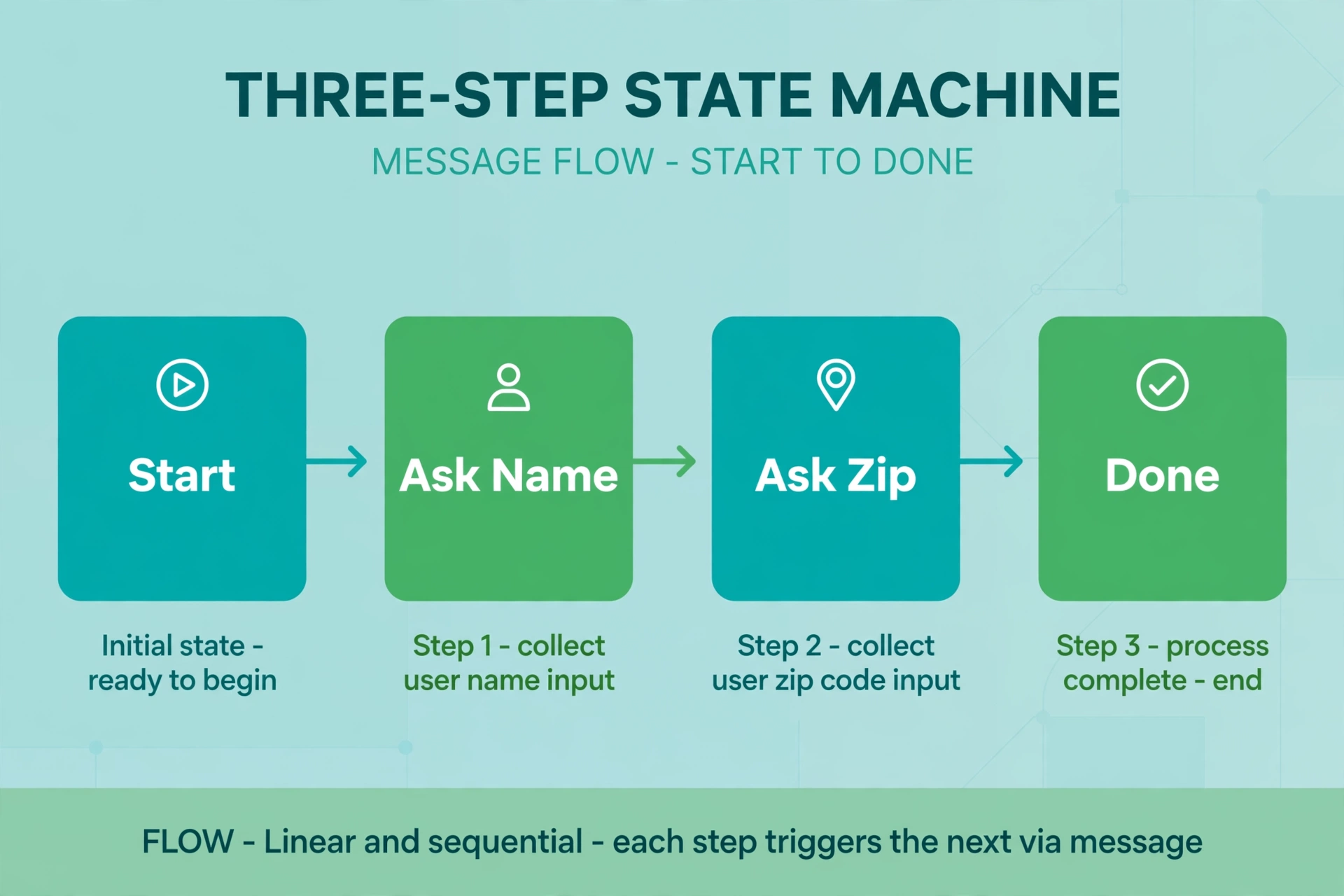
A state machine is just a fancy name for “remember which question we asked last, and interpret the next answer accordingly.” This bot collects a name, then a ZIP code, then confirms:
// bot.js
const twilio = require("twilio");
const { getSession, resetSession } = require("./sessions");

const MessagingResponse = twilio.twiml.MessagingResponse;
const OPT_OUT = new Set(["stop", "stopall", "unsubscribe", "cancel", "end", "quit"]);

function isValidZip(input) {
  return /^\d{5}$/.test(input.trim());
}

function handleMessage(from, body) {
  const text = body.trim();
  const lowered = text.toLowerCase();
  const session = getSession(from);
  const twiml = new MessagingResponse();

  // Compliance keywords bypass the state machine entirely
  if (OPT_OUT.has(lowered)) {
    resetSession(from);
    // TODO: mark the number as opted out in your database
    twiml.message("You have been unsubscribed. No further texts will be sent.");
    return twiml;
  }
  if (lowered === "help") {
    twiml.message("Reply with your name to start signup. Text STOP to opt out.");
    return twiml;
  }
  if (lowered === "restart") {
    resetSession(from);
    twiml.message("Starting over. What is your first name?");
    return twiml;
  }

  switch (session.state) {
    case "START":
      session.state = "ASK_ZIP";
      session.data.name = text.slice(0, 40);
      twiml.message(`Thanks ${session.data.name}. What is your 5-digit ZIP code?`);
      break;

    case "ASK_ZIP":
      if (!isValidZip(text)) {
        twiml.message("That does not look like a 5-digit ZIP. Please try again.");
        break;
      }
      session.data.zip = text.trim();
      session.state = "DONE";
      twiml.message(
        `Got it: ${session.data.name}, ${session.data.zip}. ` +
        "You are signed up. Reply RESTART to start over."
      );
      // TODO: persist the signup to your database here
      break;

    case "DONE":
    default:
      twiml.message("You are already signed up. Reply RESTART to start over.");
      break;
  }

  return twiml;
}

module.exports = { handleMessage };
And the route that ties it together:
// in server.js, replacing the placeholder handler
const { handleMessage } = require("./bot");

app.post("/sms", validateTwilio, (req, res) => {
  const from = req.body.From || "";
  const body = req.body.Body || "";
  const twiml = handleMessage(from, body);
  res.type("text/xml");
  res.send(twiml.toString());
});
Notice the structure: compliance keywords are checked before the state machine, every state validates its input before advancing, and there is always a RESTART escape hatch. Real users type unexpected things constantly. The default branch and the ZIP re-prompt are what keep the bot from getting stuck.
Step 5: Test it end to end
Run the server, expose it with ngrok http 3000, and set your Twilio number’s messaging webhook to the HTTPS ngrok URL plus /sms as an HTTP POST. Then text through the full flow from your phone:
- Text
helloand confirm it asks for your name (the START state treats anything as a name, which is fine for a first message). - Reply with a name, then a bad ZIP like
abc, and confirm it re-prompts instead of advancing. - Reply with a real 5-digit ZIP and confirm the summary.
- Text
stopand confirm the opt-out reply. - Wait out the session or text
restartand confirm the flow resets.
If replies never arrive, check the Twilio debugger in the console. The usual suspects are a wrong Content-Type (the route sets text/xml explicitly), an exception thrown before the response, or signature validation failing because ngrok restarted and the URL changed.
Going further
This pattern scales further than it looks. Add more states for more questions, branch on answers with simple if checks, and keep each state’s validation strict. A few production upgrades worth planning:
Move sessions to Redis. The Map works for one process. Two processes, a restart, or a deploy wipes every in-progress conversation. Redis with a TTL per key is the standard answer, and there is a dedicated tutorial on Redis-backed conversation memory in this series.
Separate concerns as flows grow. When the state machine passes five or six states, split handlers per state into their own functions or modules. A giant switch statement becomes unreadable fast.
Watch the clock. Twilio expects your webhook to respond within about 15 seconds. If a state needs to do slow work (an API call, a database write), reply with the TwiML immediately and do the slow work after, or use the REST API to send a follow-up message asynchronously.
Respect quiet hours. A signup bot that texts people at 2am will generate complaints no matter how good the flow is. The quiet hours guide explains the rules, and there is a free quiet hours checker on the tools page.
Quick compliance note: this article is not legal advice. Handle opt-outs in your own database as well as in code, and review messaging rules for every country you text.
FAQ
Why validate the Twilio signature in Node specifically?
Because Express makes it easy to skip. The SDK gives you validateRequest for exactly this, and without it anyone can POST fake inbound messages to your endpoint and trigger bot behavior, signups, or database writes.
How is session state different from cookies?
Cookies do not exist in SMS. Each webhook is an independent HTTP request from Twilio’s servers, not from the user’s phone. The only stable identifier you get is the From phone number, so that is what sessions key on.
Can I use async/await in the handler?
Yes, Express supports async route handlers. Just make sure you still send the TwiML response promptly. If the async work is slow, consider responding first and processing after, or sending follow-up messages through the REST API.
What happens when two people text at the same time?
Node’s event loop handles concurrent requests fine, and the Map keys sessions by phone number so conversations do not cross. The risk is not concurrency but multiple server processes, which is why Redis replaces the Map in production.
How do I handle MMS images in this bot?
Twilio includes NumMedia and MediaUrl0 fields in the webhook when a message has attachments. You can read those in the handler and branch on them, for example asking the user to describe the image instead. Media handling adds storage and moderation concerns, so keep it out of version one.
Is there a limit to how many states the machine can have?
No technical limit, but there is a practical one: long SMS flows lose people. If your flow needs more than four or five questions, consider whether a mobile web form linked from the SMS would convert better.
Wrapping up
You now have a Node.js SMS chatbot with the three things that separate a toy from a tool: signature validation on every webhook, per-sender sessions with expiry, and a state machine that validates input at each step and always offers a way out. The compliance keywords sit outside the flow where they belong. From here, the valuable upgrades are Redis-backed sessions, async processing for slow steps, and eventually a language model behind the states that need free-form understanding.
Want this set up for you?
I build SMS chatbots and API integrations for businesses. If you would like what this guide describes, done for you, get in touch.