An SMS chatbot is one of the simplest kinds of chatbot you can build, and that is exactly why it is so effective. There is no app to install, no account to create, and no interface to learn. A person sends a text, your server answers. In this tutorial you will build that loop from scratch: a Twilio phone number, a Flask webhook in Python that receives inbound texts, TwiML replies that send answers back, keyword routing so different messages get different responses, and the ngrok tunnel you need to test on your laptop before going live.
By the end you will have a working bot you can text from your own phone. Every snippet below is meant to be copied into a fresh project and run. Python 3.9 or newer is assumed, along with a Twilio account (the trial account works for testing) and a Twilio phone number with SMS capability.
What you are building
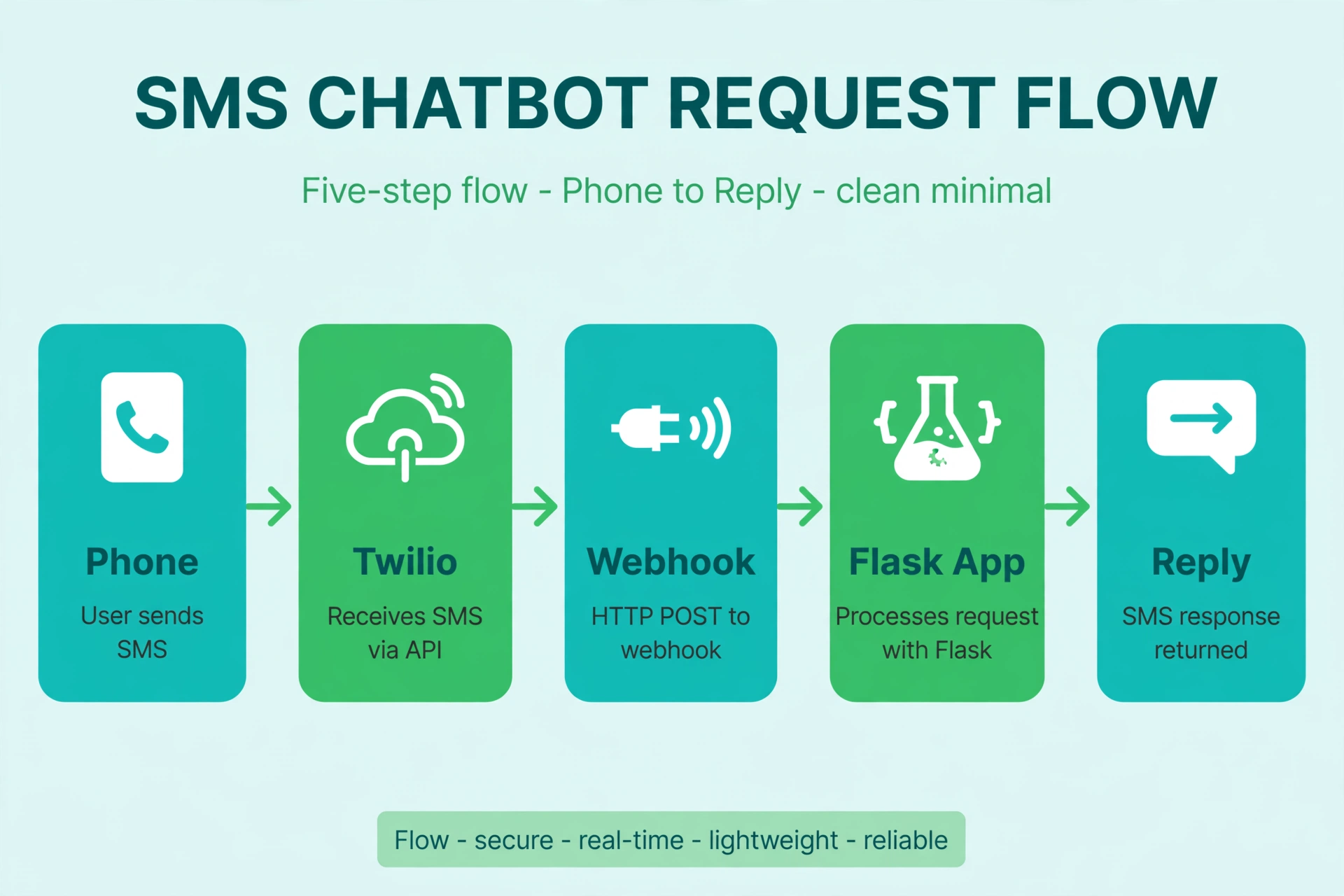
The architecture is a loop with four steps:
- Someone texts your Twilio number.
- Twilio makes an HTTP POST request (a webhook) to your server with the message details.
- Your Flask app reads the sender and the message body, decides on a reply, and returns TwiML (Twilio’s XML dialect for messaging).
- Twilio converts that TwiML into an outbound SMS back to the sender.
Your server never talks to the carrier directly. Twilio handles that part. Your only job is the HTTP endpoint and the reply logic.
Step 1: Install the pieces
Create a project folder and a virtual environment, then install the three packages you need:
mkdir sms-bot && cd sms-bot
python -m venv venv
source venv/bin/activate
pip install twilio flask python-dotenv
The twilio package is Twilio’s official helper library. flask is the web framework, and python-dotenv keeps your secrets out of your source code by loading them from a .env file.
Step 2: Store your credentials safely
Never paste your Auth Token into code. Create a .env file in the project root:
TWILIO_ACCOUNT_SID=ACxxxxxxxxxxxxxxxxxxxxxxxxxxxxxxxx
TWILIO_AUTH_TOKEN=your_auth_token_here
TWILIO_PHONE_NUMBER=+15551234567
Find these in the Twilio Console. Your Account SID and Auth Token are on the dashboard front page, and your number is under Phone Numbers. Add .env to your .gitignore right now if you use git. Leaked Auth Tokens get abused fast, and Twilio will lock an account that is sending spam through a stolen token.
Step 3: Write the webhook
Create app.py. This is the whole bot: one route that accepts Twilio’s POST, routes on keywords, and answers with TwiML.
import os
from flask import Flask, request, Response
from twilio.twiml.messaging_response import MessagingResponse
from dotenv import load_dotenv

load_dotenv()

app = Flask(__name__)

# Keyword routing table: keyword -> reply text
KEYWORDS = {
    "join": (
        "You are on the list. You will get at most 2 texts per week. "
        "Reply STOP to opt out anytime."
    ),
    "hours": "We are open Monday to Friday, 9am to 5pm local time.",
    "location": "Find us at 123 Main Street. Parking is around the back.",
    "info": (
        "We are a neighborhood bakery. Reply HOURS for opening times, "
        "LOCATION for directions, or JOIN for weekly specials."
    ),
}

HELP_TEXT = (
    "Reply INFO for what we do, HOURS for opening times, "
    "or LOCATION for directions."
)
FALLBACK_TEXT = (
    "Sorry, I did not understand that. " + HELP_TEXT
)


@app.route("/sms", methods=["POST"])
def sms_webhook():
    body = request.form.get("Body", "").strip().lower()
    sender = request.form.get("From", "")

    app.logger.info("Inbound SMS from %s: %s", sender, body)

    resp = MessagingResponse()

    # Compliance keywords are handled first, before any routing
    if body == "stop":
        resp.message("You have been unsubscribed. No more texts will be sent.")
    elif body == "help":
        resp.message(HELP_TEXT)
    elif body in KEYWORDS:
        resp.message(KEYWORDS[body])
    else:
        resp.message(FALLBACK_TEXT)

    return Response(str(resp), mimetype="text/xml")


if __name__ == "__main__":
    app.run(port=5000, debug=True)
A few things worth noticing. request.form holds the fields Twilio POSTs as form data: Body (the text), From (the sender in E.164 format), To (your Twilio number), plus a MessageSid that uniquely identifies the inbound message. Normalizing with .strip().lower() makes keyword matching case-insensitive, so “Hours”, “HOURS”, and “hours” all match.
The response is TwiML rendered as XML. MessagingResponse builds <Response><Message>...</Message></Response> for you. Returning it with mimetype="text/xml" tells Twilio exactly how to interpret it.
Step 4: Expose your laptop with ngrok
Twilio cannot reach localhost, so you need a public URL during development. Install ngrok, then in a second terminal:
ngrok http 5000
ngrok prints a forwarding URL like https://a1b2c3d4.ngrok.io. Copy the HTTPS one. In the Twilio Console, open your phone number’s configuration and paste https://a1b2c3d4.ngrok.io/sms into the “A message comes in” webhook field, with the method set to HTTP POST. Save.
Now text your Twilio number from your phone. Try info, hours, and something random to see the fallback. If nothing arrives, check two things: that your Flask app is still running, and that ngrok is still forwarding. The ngrok URL changes every time you restart it on the free plan, so you will need to update the Twilio webhook URL each session.
Step 5: Harden the webhook before you ship
The version above is fine for learning, but production needs a few upgrades.
Validate the Twilio signature
Anyone who guesses your webhook URL can POST fake messages to it. Twilio signs every webhook request with an X-Twilio-Signature header, computed with HMAC-SHA1 over the full URL and the POST parameters using your Auth Token. Validate it on every request:
from twilio.request_validator import RequestValidator
from functools import wraps
from flask import abort

validator = RequestValidator(os.environ["TWILIO_AUTH_TOKEN"])


def validate_twilio(f):
    @wraps(f)
    def wrapper(*args, **kwargs):
        signature = request.headers.get("X-Twilio-Signature", "")
        if not validator.validate(request.url, request.form, signature):
            abort(403)
        return f(*args, **kwargs)
    return wrapper
Apply @validate_twilio to your /sms route. One catch: behind ngrok or a proxy, request.url must be the exact public URL Twilio called. If validation fails only in production, the URL reconstruction is the first place to look.
Handle STOP and HELP properly
Twilio automatically handles the standard opt-out keywords (STOP, STOPALL, UNSUBSCRIBE, CANCEL, END, QUIT) for US numbers, and it will not forward those messages to your webhook in most configurations. Still, handle them in your own code too, because behavior differs by country and number type, and your own records need to stay in sync. If you keep your own subscriber list, mark the number as opted out the moment you see one of these keywords, and never text that number again unless they explicitly rejoin. This is covered in more depth in the guide to SMS opt-out keywords.
Keep replies short and plain
SMS is a 160-character world. Long replies get split into multiple segments, which costs more and reads worse. Keep every reply under 160 characters when you can. Avoid images, links with tracking parameters, and anything that looks like spam. One clear sentence beats three clever ones.
The ngrok to production path
When the bot works locally, moving to production is mostly about hosting and URLs:
- Pick a host. A small VPS or a platform like Render works well for a Flask app. You need a server that can hold a long-running process and serve HTTPS.
- Use a production WSGI server. Flask’s built-in server is for development. Install gunicorn (
pip install gunicorn) and run withgunicorn app:app. - Move secrets to the host’s environment variables. Delete the
.envfile from your deployment and set the same variables in your host’s dashboard. Secrets should never be committed to a repo. - Point Twilio at the new URL. In the console, replace the ngrok URL with
https://your-domain.com/sms. The signature validation step becomes critical here because the endpoint is now permanently public. - Check the Twilio debugger. The console’s debugger shows every webhook error, failed signature, and undelivered message. Read it after every deploy.
- Sort out your sending number. In the US, application-to-person traffic on a long code needs 10DLC registration, which involves registering your brand and campaign. Unregistered traffic gets filtered or blocked. Sort this out before you send to real users, not after.
Where to take it from here
Keyword routing covers a surprising number of real use cases: store hours, menus, appointment confirmations, simple signups. When the keyword table stops being enough, the natural next step is adding a language model behind the fallback path so the bot can answer free-form questions, with the keywords kept as fast, deterministic shortcuts. That upgrade is covered in the Twilio plus OpenAI walkthrough elsewhere in this series.
If you are collecting phone numbers through the JOIN keyword or a web form, make sure your consent story is solid before you send a single marketing text. The TCPA consent guide explains what counts as proper opt-in, and the free tools page has utilities for cleaning and validating the numbers you collect.
Quick compliance note: messaging rules differ by country and carrier, and this article is not legal advice. If you are sending at any real volume, have someone qualified review your opt-in and opt-out handling.
FAQ
Do I need a paid Twilio account to build this?
No. A trial account works for development, and you can text your own verified number. Trial accounts add a trial prefix to outbound messages and cannot text unverified numbers, so upgrade when you are ready for real users.
Why does Twilio need a webhook URL instead of polling?
Polling would mean your server constantly asking Twilio “any new messages?” which is slow and wasteful. The webhook flips it: Twilio pushes each inbound message to you the moment it arrives, usually within a second or two.
What is TwiML, exactly?
TwiML is Twilio’s XML markup for telling Twilio what to do with a call or message. For SMS, <Response><Message>text</Message></Response> means “reply with this text.” You generate it with the helper library instead of hand-writing XML.
Can one Flask app handle multiple Twilio numbers?
Yes. The To field in the webhook tells you which of your numbers received the message, so you can route or brand replies per number inside the same /sms handler.
My bot replies but Twilio shows a webhook error. What is wrong?
The most common causes are a wrong Content-Type (return text/xml, not JSON or HTML), an exception in your handler, or a signature validation failure from a mismatched URL. Check the Twilio debugger in the console; it shows the exact error and the response your server returned.
How many messages per second can this handle?
Flask with gunicorn behind a decent host handles normal chatbot volumes easily. Twilio queues outbound messages per number, and carrier throughput depends on your number type and registration. If you plan real bulk traffic, that is a different architecture with queues and workers, not a single webhook.
Watch how this works in practice. This walkthrough covers the setup step by step:
https://www.youtube.com/watch?v=C1nMXJvKZ8s
Wrapping up
You now have a complete SMS chatbot: a Flask endpoint that receives Twilio webhooks, routes messages by keyword, replies with TwiML, and handles the compliance keywords. The same pattern scales from a weekend project to a production service. The main things that change as you grow are hosting, signature validation, idempotency for retried webhooks, and proper number registration. Get those right and the bot itself barely changes.
Want this set up for you?
I build SMS chatbots and API integrations for businesses. If you would like what this guide describes, done for you, get in touch.