
Most businesses still lose bookings to phone tag. A customer calls during your lunch break, nobody picks up, and they call the next business on the list. An SMS chatbot booking flow fixes this by letting people book, confirm, and reschedule through plain text messages. No app to install. No portal to log into. Just the messaging app they already use.
This guide covers how the booking flow works, where it fits best, how to connect it to your calendar, and how to keep no shows down.
Why Booking by Text Works
Text messages get read far more often than emails, and people reply in minutes instead of hours or days. That matters for booking because every hour of delay is a chance for the customer to go elsewhere. Two way texting turns it into a real booking channel: customers can ask for a different time, change the service, or cancel right in the thread, and staff step in only when something unusual comes up.
Use Cases That Fit an SMS Booking Flow
Appointment based businesses are the natural fit. A salon client texts “book a haircut” at 10 pm, picks a stylist and a slot from the live calendar, and gets a day before reminder with a “reply C to confirm or R to reschedule” prompt. A new dental patient texts after seeing a flyer, gets the next two available mornings, and receives intake instructions plus a reminder. Healthcare messages stay limited to date, time, and location, since no medical details should appear on a message screen.
A homeowner texts about a plumbing quote, the bot asks a couple of quick questions and offers arrival windows from the technician schedule. If nobody will be home, the bot moves the job to the next open window instead of sending a technician to a locked door. Consultants use the same pattern for discovery calls: the prospect picks a time from the calendar and gets reminders with the video call link, with no email back and forth about availability.
Designing the Booking Flow
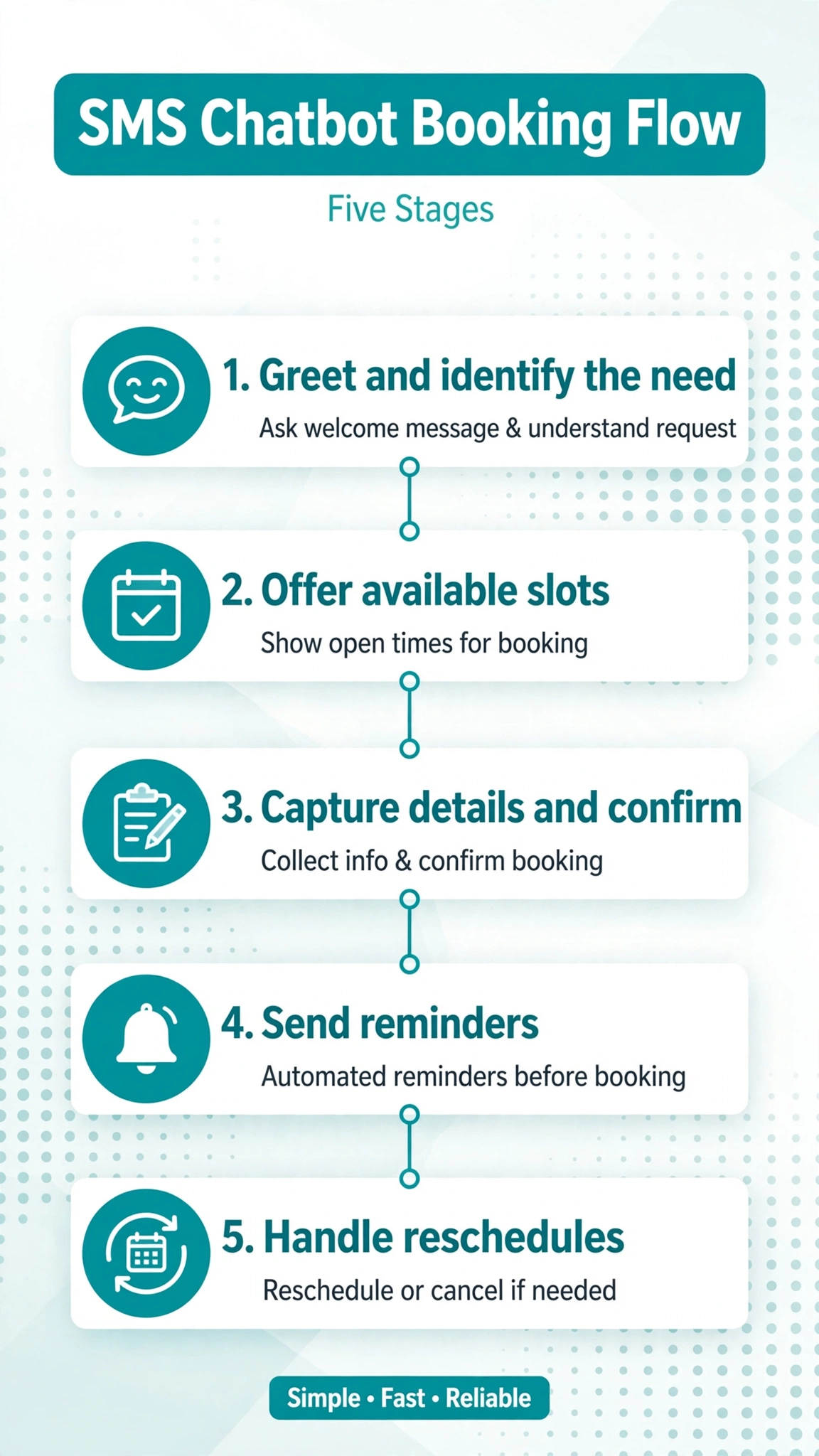
A good text based booking flow has five stages. Each is simple on its own, and together they make a conversation that feels natural.
1. Greet and Identify the Need
The bot opens with a short greeting and asks what the customer wants. Returning customers can be recognized by their phone number so the bot skips the name and address questions.
2. Offer Available Slots
Never show the whole calendar. Offer two or three specific slots at a time, the way staff do when they say “I have Thursday at 2 or Friday at 11, which works better?” Numbered choices work well because customers can reply with a single digit.
Before showing any slot, the bot must check live availability. Showing a slot that is already taken is the fastest way to lose trust in the system.
3. Capture Details and Confirm
Once the customer picks a slot, the bot repeats the full details back: date, time, service, and provider name. This preview catches misunderstandings before they become missed appointments. The customer replies yes or no. A yes locks the booking. A no restarts slot selection without losing the rest of the conversation.
4. Send Reminders
Reminders are part of the flow, not an afterthought. A common cadence is one message a day or two before and a short nudge a few hours before. Each reminder names your business, gives the date and time, and says how to confirm or reschedule by reply.
5. Handle Reschedules and Cancellations
When a customer replies that they need to move the appointment, the bot offers the nearest open slots, releases the old one, and confirms the new one. If a waitlist is running, the freed slot goes to the next person.
Sample End to End Conversation
Here is the full exchange for a salon booking:
Bot: Hi, this is Bella’s Salon. Want to book, reschedule, or check an existing appointment?
Customer: Book a haircut
Bot: Got it. Which day works for you, Thursday or Friday?
Customer: Thursday
Bot: I have Thursday at 2:00 pm with Maya or 4:30 pm with Luis. Reply 1 or 2.
Customer: 1
Bot: Please confirm: Haircut with Maya on Thursday at 2:00 pm. Reply YES to book or NO to pick a different time.
Customer: YES
Bot: You are booked. Thursday at 2:00 pm with Maya at Bella’s Salon, 12 Oak Street. We will text you the day before. Reply STOP to opt out of messages.
Bot (day before): Reminder: your haircut with Maya is tomorrow at 2:00 pm. Reply C to confirm or R to reschedule.
Customer: C
Bot: Confirmed. See you tomorrow.
Notice what the bot never does. It asks one question per message, offers no more than three slots at once, and never guesses when the customer is vague. When the customer says “Thursday” without a time, the bot offers times instead of picking one.
Calendar Integration Options
The bot is the conversation layer. Your calendar is the source of truth for availability. How the two connect depends on what you already use.
Google Calendar
Many small businesses run their whole schedule on Google Calendar. Booking tools and automation platforms can read free and busy times from it and create events when a customer confirms. Several reminder apps plug directly into Google Calendar and handle reminders and replies without any custom code.
Calendly
Calendly works as the booking front end for many consultants and teams. Customers pick from a booking page, and the appointment lands on the connected calendar. An SMS chatbot can text the customer the booking link, then use the resulting calendar event to send reminders and handle confirmations by reply. The calendar stays the single record of what is booked.
Acuity Scheduling (Squarespace Scheduling)
Acuity is built for appointment businesses. It includes its own email and text notifications, payment collection through processors like Stripe and PayPal, and intake forms, and it syncs with Google, iCloud, and Outlook calendars.
Cal.com
Cal.com is an open source scheduling tool that many technical teams prefer because it can be self hosted and extended. It connects to popular calendars and exposes booking data through its API, which makes it a common availability source for custom built SMS chatbots.
The pattern is the same in every case. The chatbot asks the calendar what is free, the customer picks a slot, the chatbot writes the booking back to the calendar, and reminders fire off the calendar record.
No Show Safeguards
Bookings are only half the job. Four safeguards do most of the work on getting people to show up.
Ask for an explicit confirmation. A “reply YES to confirm” message a day before the appointment changes the psychology. A large 2022 pragmatic study across more than 125,000 primary care visits and 33,000 mental health visits found that an extra reminder text cut no shows measurably. Make confirmation a reply the customer sends, not just a message they receive.
Use a reminder cadence. A message 24 hours before plus a nudge a few hours before covers both planners and forgetters. Keep it short: business name, date, time, and how to reply.
Consider deposits for expensive slots. For services where a no show costs real money, many businesses collect a deposit or card on file at booking time through a payment link sent by text. The bot treats the booking as locked in only once the deposit clears.
Run a waitlist. Every cancellation is a slot you can refill if someone is waiting. When a customer cancels by text, the bot can immediately offer the freed slot to the next person on the waitlist.
Time your reminders with the SMS quiet hours checker so they never land in the middle of the night in any US state.
Edge Cases to Plan For
The happy path is easy. The edge cases are what separate a good booking bot from a frustrating one.
Double booking. Two customers can grab the same slot at the same time, or someone books through the bot while another books through your website. Make the calendar the single authority and recheck availability at the moment of confirmation, not just when slots were first offered. If the slot filled in between, the bot apologizes and offers the closest alternatives.
Time zone handling. Ask the customer which time zone they are in the first time they book, and store it. Confirm every appointment with the time zone spelled out, like “2:00 pm Eastern.” For a purely local business, an “all times are local” note in the confirmation is enough.
Rescheduling mid flow. Customers change their minds mid conversation. The bot should accept “actually, make it Friday” at any point, even during confirmation. Test interruptions before you launch, because rigid step by step scripts break here.
Unclear input. When a customer says “sometime next week” the bot should ask a follow up question instead of guessing. Asking one clarifying question is always better than booking the wrong slot.
FAQ
Does the customer need to install an app?
No. The customer uses the texting app already on their phone. There is nothing to download, no account to create, and no portal to log into.
Can customers confirm or reschedule just by replying to a text?
Yes, and they should be able to. The standard pattern is structured replies like C to confirm, R to reschedule, and STOP to opt out. The system reads the reply and updates the booking record automatically.
Do I need the customer’s consent before sending booking texts?
Yes. Booking and reminder texts require consent, and marketing texts have stricter rules than transactional ones. Get clear permission at the point of booking or sign up, include opt out instructions, and honor opt outs immediately. If you are unsure about the rules in your situation, check with a qualified professional. This article is general information, not legal advice.
How do I prevent double bookings?
Check availability twice: once when offering slots and again at the moment of confirmation. If two customers pick the same slot, the second attempt fails gracefully and offers alternatives.
How should time zones be handled in text booking?
Capture the customer’s time zone on first booking and always confirm with it named, like “2:00 pm Eastern.” For a local business, an “all times are local” note is enough.
What happens if a customer never confirms their appointment?
Decide the policy in advance: send an extra reminder, release the slot to the waitlist after a cutoff time, or flag unconfirmed bookings for a quick staff call.
Can I take deposits through text message booking?
Yes. Many businesses send a payment link by text after the customer picks a slot, and the booking is only locked in once the deposit clears.
Are text reminders more effective than email reminders?
For getting attention, yes. Text messages are opened far more often and far faster than email, which is why reminder texts cut no shows while reminder emails often go unread.
Watch how this works in practice. This walkthrough covers the setup step by step:
Conclusion
SMS chatbot appointment booking works because it meets customers where they already are. The design is straightforward: greet, offer a few real slots from your live calendar, confirm the details back, and follow up with reminders that accept replies. Protect the schedule with confirmations and a waitlist, and plan for double booking and time zones before they happen.
Start with one service and one calendar, get the conversation right, and expand from there. For more ideas on what chatbots can do over text, browse the free tools hub. To estimate what a month of booking texts will run, try the bulk SMS cost calculator.
Want this set up for you?
I build SMS chatbots and API integrations for businesses. If you would like what this guide describes, done for you, get in touch.