Half of event marketing happens before the event even starts. You send invitations, chase RSVPs, remind people twice, answer the same parking question forty times, and still get no-shows on the day. A text chatbot takes most of that off your plate. Guests reply to your number like they would text a friend, the bot records their answer, sends reminders on schedule, and handles the logistics questions that would otherwise land in your inbox.
Where an SMS chatbot fits in event planning
A text-based RSVP flow beats email for one simple reason. People read texts fast and reply fast. A text that asks them to reply YES or NO gets an answer in minutes because the reply takes five seconds.
The chatbot part matters once answers get messy. Real guests reply things like “trying to make it” or “yes but I might be late.” A chatbot can ask the follow up question instead of leaving the reply unhandled.
Wedding RSVP by text
Couples typically mail formal invitations and run the RSVP over text. The guest gets a text naming the couple, the date, and the deadline. They reply YES, and the bot asks how many are in the party, then asks for meal choices if the caterer needs them. Polite nudges before the deadline catch the guests who meant to reply and forgot: one two weeks before, one three to five days before.
Webinar reminders
Webinars are the classic no-show problem. Registration is free and frictionless, so people sign up casually and forget. A text sequence changes the math: a confirmation text with the join link at signup, a reminder the day before, a nudge an hour before, and a short “we are live” text at start time. Each message carries the join link because a reminder without the link sends the guest hunting through old emails.
Corporate event logistics
For conferences and trainings, the chatbot answers from a short FAQ list so staff stop fielding the same parking, entry, and wifi questions. When a room changes or the schedule shifts, one broadcast text updates everyone at once.
Meetup confirmations
Community meetups run on smaller budgets and looser structure. The organizer texts the invite to the group list, guests reply YES or NO, and confirmed guests get a logistics text the day before. If the count comes in low, the organizer texts the maybes instead of guessing.
Designing an RSVP by text flow
Guests abandon flows that feel like a phone tree. Keep the four pieces, the invitation text, keyword handling, the follow up questions, and the confirmation, each short.
The invitation text
Name the event, give the date and time, and tell the guest exactly how to reply. Personalize with their first name so it reads like a message from a person.
Hi Priya, you are invited to the Aligarh Founders Meetup on Sat, Oct 10 at 6 PM at The Hub, Gulberg. Reply YES to confirm or NO if you cannot make it. Details: smsmarketingdata.com/meetup
YES/NO keyword handling
Keep the keyword list short and tell the guest the words in the invitation. YES and NO cover most cases. MAYBE works for casual events but doubles your follow up work.
Handle the common variations. People reply “yep”, “yeah”, “y”, and the bot should treat them all as YES. The same goes for no, nope, and n. If the bot cannot parse a reply, it asks one clarifying question.
Sorry, I did not catch that. Are you coming to the Founders Meetup on Oct 10? Reply YES or NO.
One clarification attempt is enough. If the guest still does not give a clear answer, log it as unconfirmed and move on.
Plus-one counts, meal or session choices, and RSVP changes
Once the guest says YES, the bot collects the details in one or two short questions. Ask for the party size first, then the choices.
Great, you are confirmed. How many people are coming in total, including you? Just reply with a number.
For a conference, the same pattern collects session choices instead of meals. One question per text.
Plans change, so tell guests in the confirmation text that they can update their answer any time.
You are confirmed for the Founders Meetup, Oct 10 at 6 PM. If your plans change, just reply UPDATE and I will walk you through it.
When the guest replies UPDATE, the bot restarts the flow and overwrites the old record, timestamped so the exported headcount stays current.
No problem, I have marked you as not attending. Hope to see you at the next one.
Reminder cadence that works
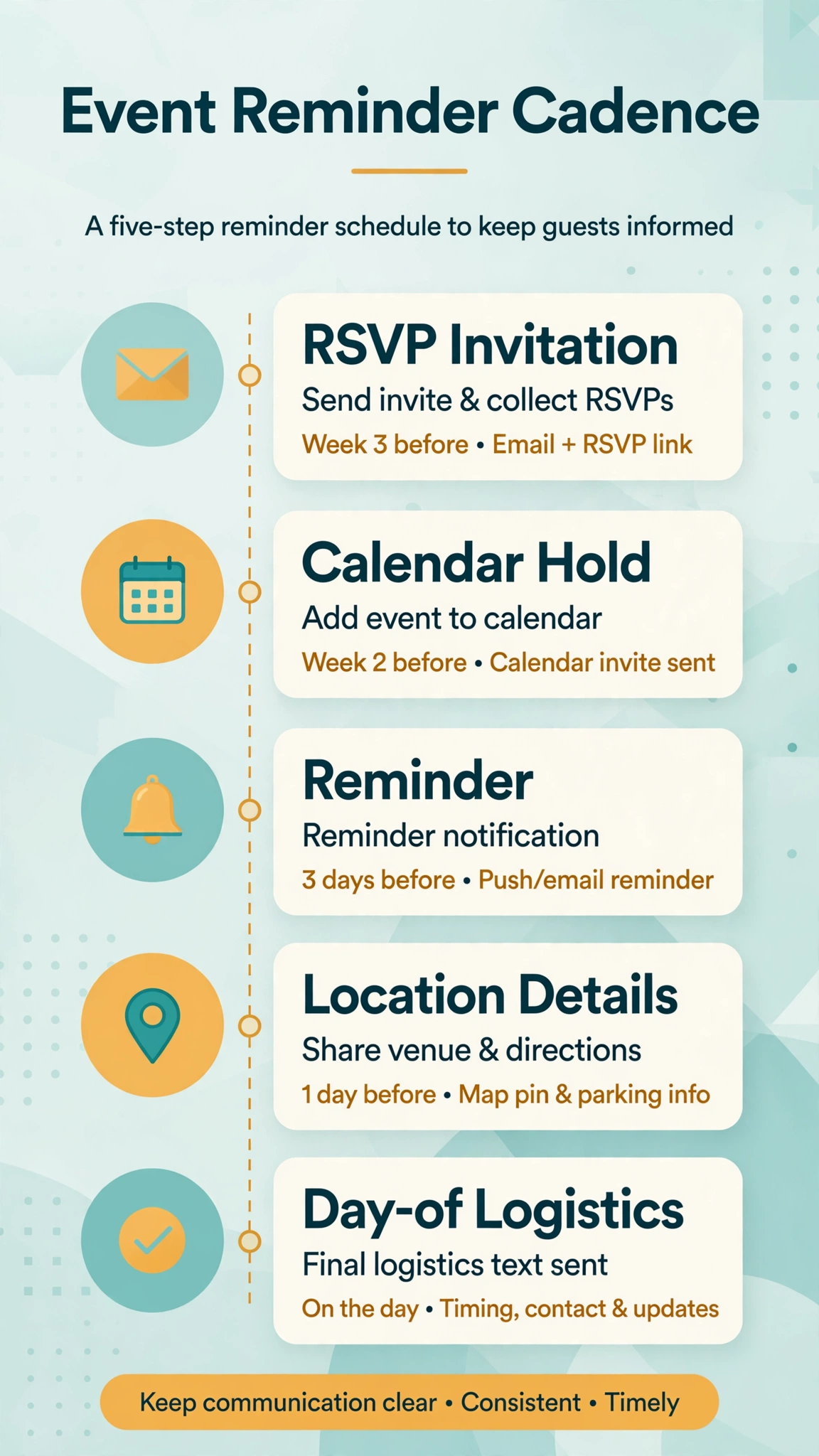
The most common mistake is sending too many texts. Three to four total messages across the whole event lifecycle is the right budget for most events. Every message needs a reason to exist. A cadence that works for events planned weeks out looks like this.
Two nudges before the RSVP deadline, to non responders only. One two weeks out, one three to five days out. Never send these to confirmed guests.
Hi Priya, quick reminder that RSVPs for the Founders Meetup (Oct 10) close on Oct 3. Can you make it? Reply YES or NO.
Last call for RSVPs to the Founders Meetup on Oct 10. We need the headcount by Oct 3. Reply YES or NO.
One week before the event, to confirmed guests. The first logistics message: date, time, venue, and one useful detail like parking.
One week to go. Founders Meetup, Sat Oct 10, 6 PM at The Hub, Gulberg. Free parking behind the building. Reply PARKING anytime for directions.
One day before the event. The last planning text. Repeat the essentials and add anything that changed.
Tomorrow: Founders Meetup at 6 PM, The Hub, Gulberg. Doors open at 5:30. Bring a photo ID for check-in. See you there.
Day of, for virtual events. Webinars and live streams get a start time text because the only failure mode is forgetting.
We are live in 10 minutes. Join the webinar here: [join link]
For webinars booked on short notice, compress this: confirmation at signup, a one day reminder, a one hour nudge, and the go-live text.
Check your local quiet hours before scheduling anything. Our SMS quiet hours checker shows the restricted windows state by state.
Day-of logistics texts
Teach guests the keywords in the one day reminder: PARKING, DIRECTIONS, WIFI, AGENDA, CONTACT.
Today is the day. Founders Meetup at 6 PM, The Hub, Gulberg. Doors open 5:30. Reply PARKING for parking info, AGENDA for the schedule, or HELP to reach a human.
Schedule changes go out as broadcasts. Put the change in the first sentence.
Schedule change: the keynote moved from Hall A to Hall B. Everything else is unchanged. Updated agenda: [link]
Reducing no-shows
No-shows are rarely about people not caring. They are about friction and forgetting. Your job is to remove the friction.
Ask for an active confirmation, not a passive one. A text that asks the guest to reply YES the day before creates a small commitment, and commitments get kept.
Still planning to join us tomorrow at 6 PM? Reply YES to keep your spot.
Remind late, not early. A reminder three weeks out gets forgotten again. The texts that move attendance are the one day and day-of messages because they arrive when the guest can act on them. Follow up with the maybes too. Guests who replied MAYBE or never replied are your swing audience, and one personal-feeling text the day before converts a real share of them.
Have a plan for the no-shows. After the event, text the people who confirmed but did not show up. Keep it friendly and useful.
We missed you at the Founders Meetup yesterday. Here is the slide deck: [link]. Our next meetup is Nov 14. Want a reminder? Reply YES.
This turns a no-show into an engaged contact. If you are budgeting message volume, run it through our bulk SMS cost calculator first.
Copy-ready template pack
The body showed the core templates already. Here are the rest. Fill in the brackets.
One-week logistics
One week to go. [Event Name], [Day, Date] at [Time], [Venue]. [One useful detail, e.g. free parking behind the building]. Reply PARKING anytime for directions.
Day-of (virtual)
We are live in 10 minutes. Join [Event Name] here: [join link]
Schedule change broadcast
Update for [Event Name]: [what changed, e.g. the keynote moved from Hall A to Hall B]. Everything else is unchanged. Details: [link]
Post-event follow up
Thanks for coming to [Event Name]. Here is [the deck / the recording / the photos]: [link]. Our next one is [Date]. Reply YES if you want a reminder.
Waitlist spot
A spot opened for [Event Name] on [Date] at [Time]. Reply CLAIM within 30 minutes to take it.
Want this set up for you?
I build SMS chatbots and API integrations for businesses. If you would like what this guide describes, done for you, get in touch.
Frequently asked questions
How do I RSVP by text message?
Reply to the invitation text with the keyword it asks for, usually YES or NO. The bot confirms right away. Answer each follow up question in a separate reply.
How do I set up text message RSVPs for an event?
Collect guest phone numbers with consent, choose an SMS platform with two way messaging, and write your invitation text with a clear keyword. Then build the follow up sequence: confirmation, deadline reminders, logistics texts.
What information should I collect in an RSVP flow?
Guest name, attending yes or no, and party size are the baseline. Add meal choices for catered events and session picks for conferences. Every extra question drops your completion rate.
Can I send automatic reminders to people who have not responded?
Yes. Filter by reply status so confirmed guests never get the nag, then send two nudges to the rest: one about two weeks before the deadline and one three to five days before it.
How many reminder texts should I send before an event?
Three to four total: the invitation, one or two deadline reminders to non responders, and one or two logistics texts to confirmed guests. Every text should carry information the guest does not already have.
Is it rude to send RSVP reminders by text?
Not if you keep them short and infrequent. Most guests are not ignoring you, they just forgot. What feels rude is texting daily or texting people who already replied.
What do I do if a guest does not respond to the RSVP text?
Send the two scheduled nudges, then call or text the important ones personally after the deadline. For everyone else, plan as if they are not coming.
How do I handle guests who change their RSVP?
Tell guests in the confirmation text that they can reply UPDATE any time. The bot restarts the flow, records the new answer with a timestamp, and confirms the change.
A note on consent and compliance
Event texts require consent. Only text people who agreed to hear from you, whether on the registration form, in the invitation reply, or through an earlier opt in. Honor STOP requests immediately and keep every message relevant to the event. This is general guidance, not legal advice. Texting rules vary by country and message type, so check the regulations that apply to your audience before you launch.
Conclusion
An SMS chatbot does not replace event planning. It replaces the repetitive parts: collecting RSVPs, chasing non responders, repeating parking instructions, and broadcasting schedule changes. Set up the keyword flow, keep the reminder cadence tight, and let the bot handle the day-of questions. You get a more accurate headcount, fewer no-shows, and your time back for the parts that need a human.
Before you schedule anything, browse the free tools hub and run the quiet hours checker and the cost calculator so your sends stay compliant and on budget.