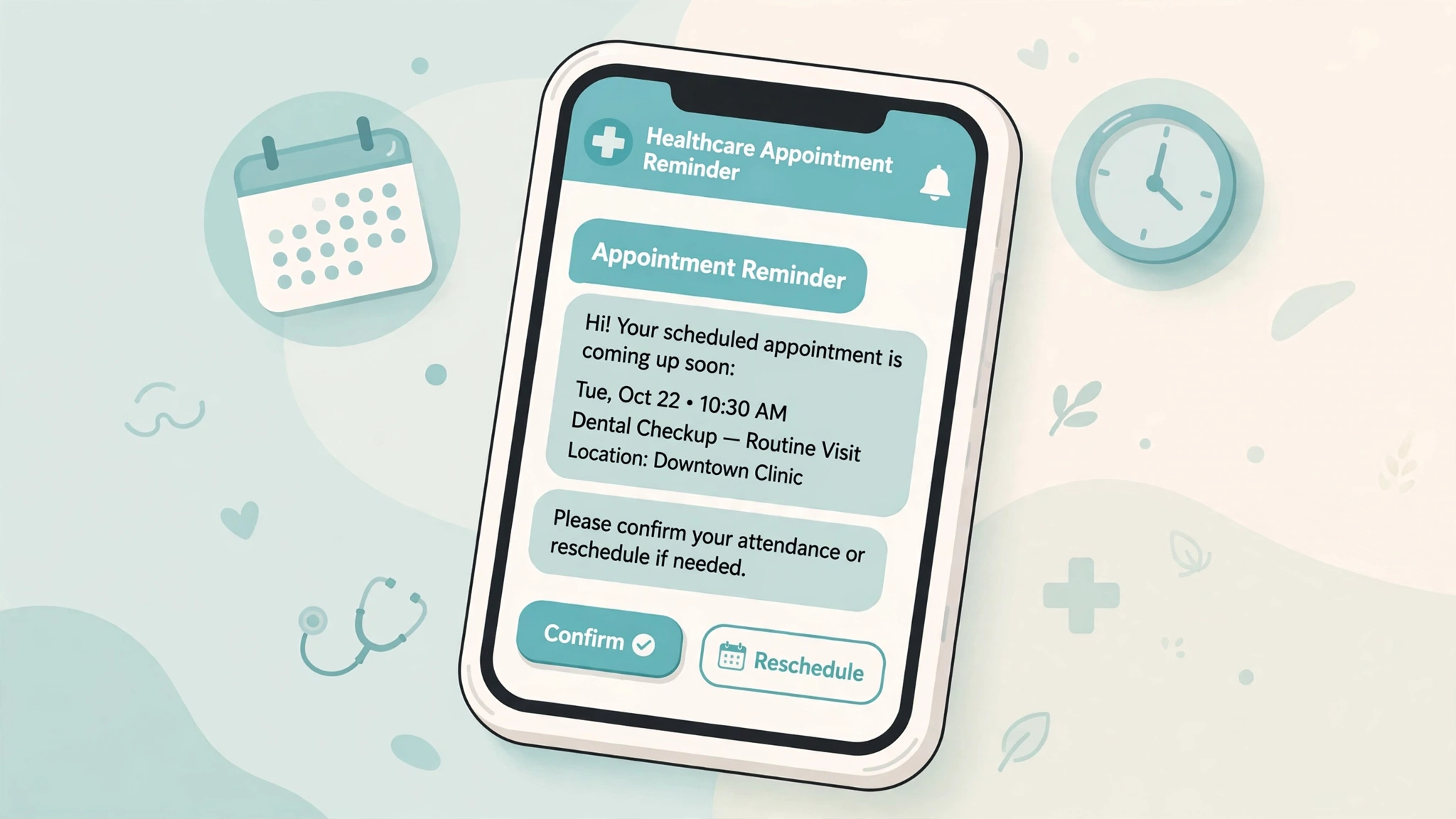
A missed appointment costs a clinic more than an empty chair. The front desk scrambles to fill the slot, the provider loses productive time, and the patient often ends up sicker because care got delayed. Text reminders help, but most guides stop at the reminder itself.
The harder part is the conversation that follows. A patient replies “I can’t make it Thursday, can I do Friday morning?” and a one-way reminder system just sits there. Someone has to read that message and act on it, and in a busy practice that someone is usually a receptionist who is already on another call. An SMS chatbot fills that gap: a texting assistant that confirms, reschedules, and sends intake forms without a human touching every message. Patient texting sits at the intersection of HIPAA and the TCPA, so the conversations have to be built carefully. This guide walks through how to do it right.
Quick note before we start: nothing here is legal advice. Healthcare messaging rules have real consequences, so have your own compliance counsel review your setup before you turn anything on.
Use Cases: What the Chatbot Actually Handles
A healthcare SMS chatbot is not a symptom checker and it is not giving medical advice. It handles the administrative layer of the patient visit.
Appointment reminders with real confirmations
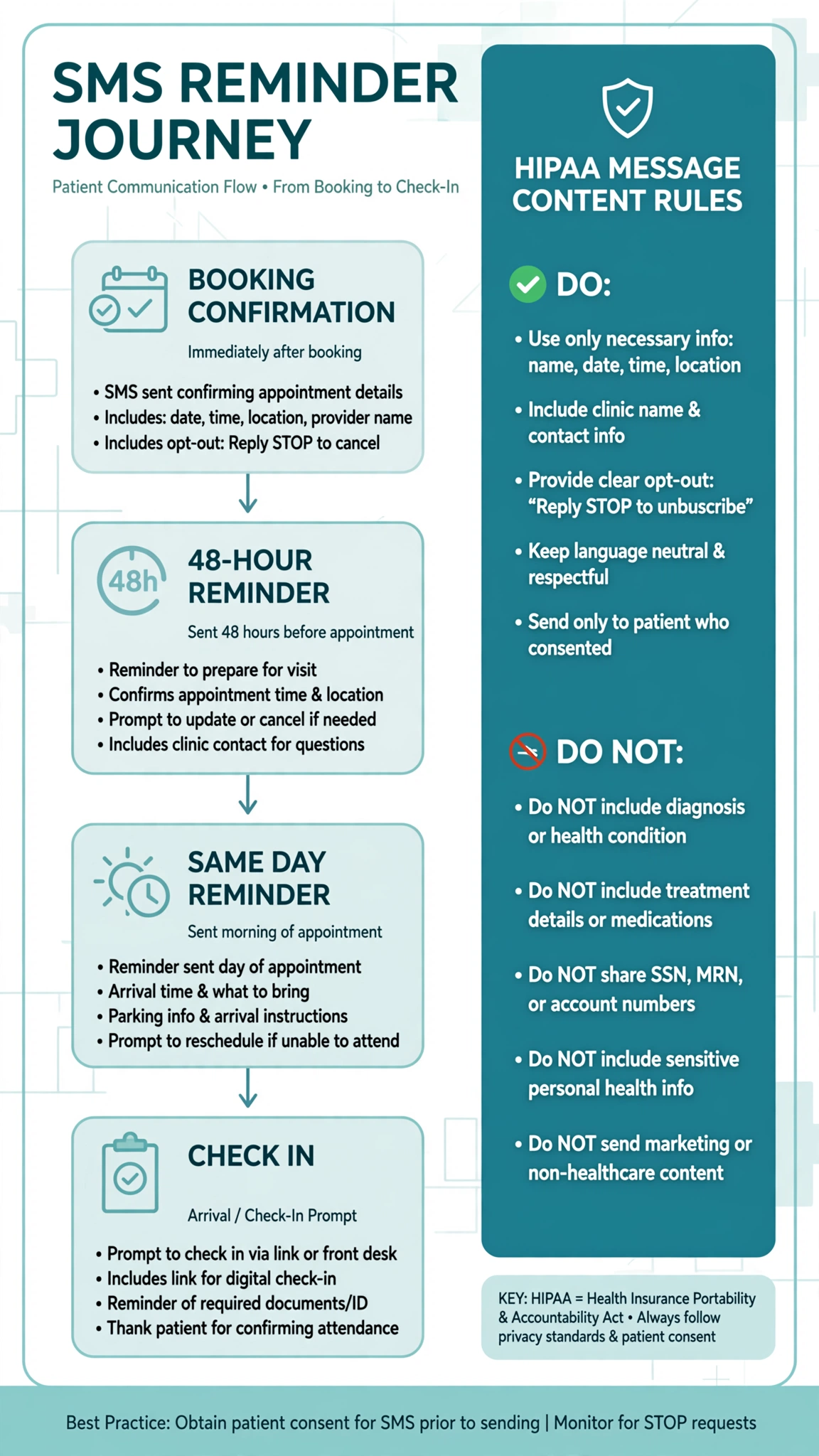
The classic use case. The patient books a visit, and the chatbot sends a short sequence: a booking confirmation right away, a reminder two days out, and a same day reminder a few hours before. Each message invites a reply. “Reply C to confirm or R to reschedule” turns a passive reminder into an attended appointment.
The chatbot matters because confirmations are not always a single letter. Patients reply “yes,” “see you then,” “confirmed,” and “ok.” The bot reads all of those as confirmation and logs it. One-way systems only count the exact keyword, and everything else lands in a queue nobody checks.
HIPAA Considerations for Patient Texting
This is the section most vendor guides rush through, and it is the one that matters most.
Keep protected health information out of the texts
Under HIPAA, appointment reminders count as part of treatment, so they do not need the special written authorization that marketing messages do. You still need the patient’s consent to text them at all, which is a separate TCPA requirement.
The core principle is simple: standard SMS is not encrypted in transit, and you cannot control whose phone screen displays the message. So keep every message to the minimum necessary. The reminder says who it is from, the date, the time, and the location. It does not say why the patient is coming in.
A safe reminder looks like this: “Hi Maria, this is Riverside Dental. Reminder: your appointment is Thursday at 2:30 pm. Reply C to confirm or R to reschedule. Reply STOP to opt out.” No specialty, no reason for the visit, no results, no medications. A locked phone screen reveals nothing about the patient’s health, and that minimum necessary approach is the heart of HIPAA compliant texting.
Sign a business associate agreement with your SMS vendor
If your messages will ever include protected health information, or if the vendor stores message content that could include it, the vendor must sign a business associate agreement with your practice. Do not take a vendor’s marketing page at its word. Ask for the BAA in writing before you send a single message, and confirm it covers the specific products you are using. If a vendor will not sign one, treat that as a hard no.
Capture consent at intake and keep marketing separate
The practical way to get consent is a clear checkbox or signature line on your intake forms confirming the patient agrees to texts about appointments and care, with an easy STOP to opt out. Store that record in the patient’s file. Keep care messages and marketing apart in your consent records and sending lists, since marketing texts need a higher level of written consent.
Let the portal handle anything clinical
The chatbot should redirect clinical questions, not answer them. If a patient texts “are my lab results back” or describes symptoms, the bot replies with something like: “I can help with scheduling and forms. For questions about your results, please check your patient portal or call us at this number.” This keeps the chatbot in the administrative lane and sensitive conversations in encrypted channels.
Intake Form Links: The Text That Saves Fifteen Minutes
New patient paperwork is the other big friction point. The forms arrive by email, the patient never opens them, and the front desk spends fifteen minutes on a clipboard at check in. A chatbot fixes this by texting a secure link to the intake form right after booking, then following up once if it is not completed.
Text one, right after booking: “Thanks for booking with Riverside Dental. Please complete your intake forms before your visit: secure link here. It takes about five minutes.”
Text two, if the form is not done 24 hours before the visit: “Quick reminder: your intake forms for tomorrow’s appointment are still waiting at this link. Completing them now means no clipboard when you arrive.”
The link must go to a secure page, ideally your patient portal, and you never collect health details inside the SMS thread itself. If the patient says the link does not work, the chatbot offers to resend it once, then offers to connect them with the front desk. Log form completion in the patient record so the front desk can see who still needs paperwork.
Conversational Rescheduling Flows That Actually Work
The rescheduling conversation is where a chatbot proves itself. Here is a flow design that handles the common cases.
The basic flow
The patient replies to a reminder with something like “I need to reschedule.” The bot first confirms the current appointment so both sides agree on what is being moved. Then it asks for a preference, checks the live schedule, and offers the two or three closest matches. The patient picks one, the bot books it, cancels the old slot, and sends a new confirmation. The whole exchange can happen at 11 pm, with no voicemail and no hold time.
Handling the edge cases
Real patients do not follow scripts, so the flow needs escape hatches. If the patient names a time with no availability, the bot says so plainly and offers the nearest alternatives, and it never invents a slot that does not exist. If the schedule integration is down, the bot admits it and offers a front desk callback instead of guessing. When the patient asks something the bot cannot do, like requesting a prescription refill, it gives the boundary answer: scheduling only, plus directions to the portal or phone number. Two failed attempts at the same task should trigger a handoff, and a STOP reply always ends the conversation immediately, even mid reschedule.
Timing the reminder sequence
A sequence that works well for most practices: a booking confirmation immediately, a reminder 48 hours before, and a final reminder two to four hours before the appointment. Every message keeps the reschedule option visible, because the earlier a patient reschedules, the more likely you are to refill the slot. Check your state’s quiet hours rules before scheduling anything overnight: a 6 am same day reminder for a 9 am appointment is fine, while a 2 am message is asking for an opt out.
Reducing No-Shows Without Being Annoying
The goal is fewer empty slots, not more texts. Make confirming easier than ignoring: a single reply letter should be enough, since every extra step costs completions. Treat rescheduling as a win, not a loss. A patient who moves an appointment still shows up, just on a different day, so make rescheduling feel easy and judgment free. When someone cancels by text, ask if they want to rebook right away before offering the slot to the waitlist. Some patients cancel reflexively and will take a new time if one is offered in the same breath.
Log every reminder sent, every confirmation, every reschedule, and every opt out. That record proves consent handling for compliance and tells you which reminder timing works best. Keep marketing out of the reminder stream entirely. Patients trust the reminder number only when it tells them something useful.
FAQ
Are healthcare appointment reminder texts HIPAA compliant?
They can be. Reminders count as part of treatment, so they do not need special authorization. The rule is content: keep the message to the minimum necessary, meaning practice name, date, time, and location. Leave out the reason for the visit, diagnoses, and test results. If a message must carry protected health information, route it through a vendor that has signed a business associate agreement with your practice.
Do I need a patient’s consent before texting appointment reminders?
Yes. Under the TCPA you need the patient’s prior consent before texting them. For care related messages like appointment reminders, consent given by providing a mobile number for that purpose is generally the standard, while marketing texts require prior express written consent. Capture consent at intake, store the record, and honor opt outs immediately. HIPAA and the TCPA are separate requirements, so you must satisfy both.
What should a medical appointment reminder text say?
Name the practice, give the date and time, and include one clear action: reply to confirm or reschedule. Leave out the reason for the visit and any clinical detail, then end with an opt out instruction. A locked phone screen should reveal nothing about the patient’s health.
How many reminder texts should I send per appointment?
A three message sequence works well: a confirmation immediately after booking, a reminder 48 hours before, and a final reminder two to four hours before the visit. Keep each message short, and keep the reschedule option visible in every message so patients move appointments instead of missing them.
Can a chatbot reschedule appointments by text?
Yes, if it is connected to your scheduling system. The patient replies in plain language, the bot confirms which appointment is being moved, offers real open slots, and rebooks. The key requirements are a live schedule integration so the bot never offers a slot that does not exist, and a handoff path to a human when the bot cannot finish the task after a couple of tries.
Do I need to register my number to text patients?
If you send texts through software using a regular 10 digit number, US carriers generally require registration under A2P 10DLC rules, or the messages can be blocked or surcharged. Registration ties your practice identity and message types to the sending number. Nearly every reminder and chatbot system runs through software, so plan on registering.
What happens when a patient texts something the chatbot cannot handle?
The bot recognizes the boundary and redirects. Clinical questions, prescription requests, and billing disputes get a polite redirect to the patient portal or a phone number. After two failed attempts at a task, the bot offers a human callback. If the patient replies STOP at any point, the opt out takes priority over everything else in the conversation.
Conclusion
A healthcare SMS chatbot is two things at once: a convenience for patients who would rather text than call, and a compliance exercise that has to be built carefully from the start. Keep messages to the minimum necessary, get a signed business associate agreement from your vendor, capture consent at intake, and keep clinical conversations in the portal.
If you are planning the timing of your reminder sequences, check the quiet hours rules for your state before you schedule anything overnight, and browse the free SMS tools to sanity check the operational side before you scale up.
Want this set up for you?
I build SMS chatbots and API integrations for businesses. If you would like what this guide describes, done for you, get in touch.