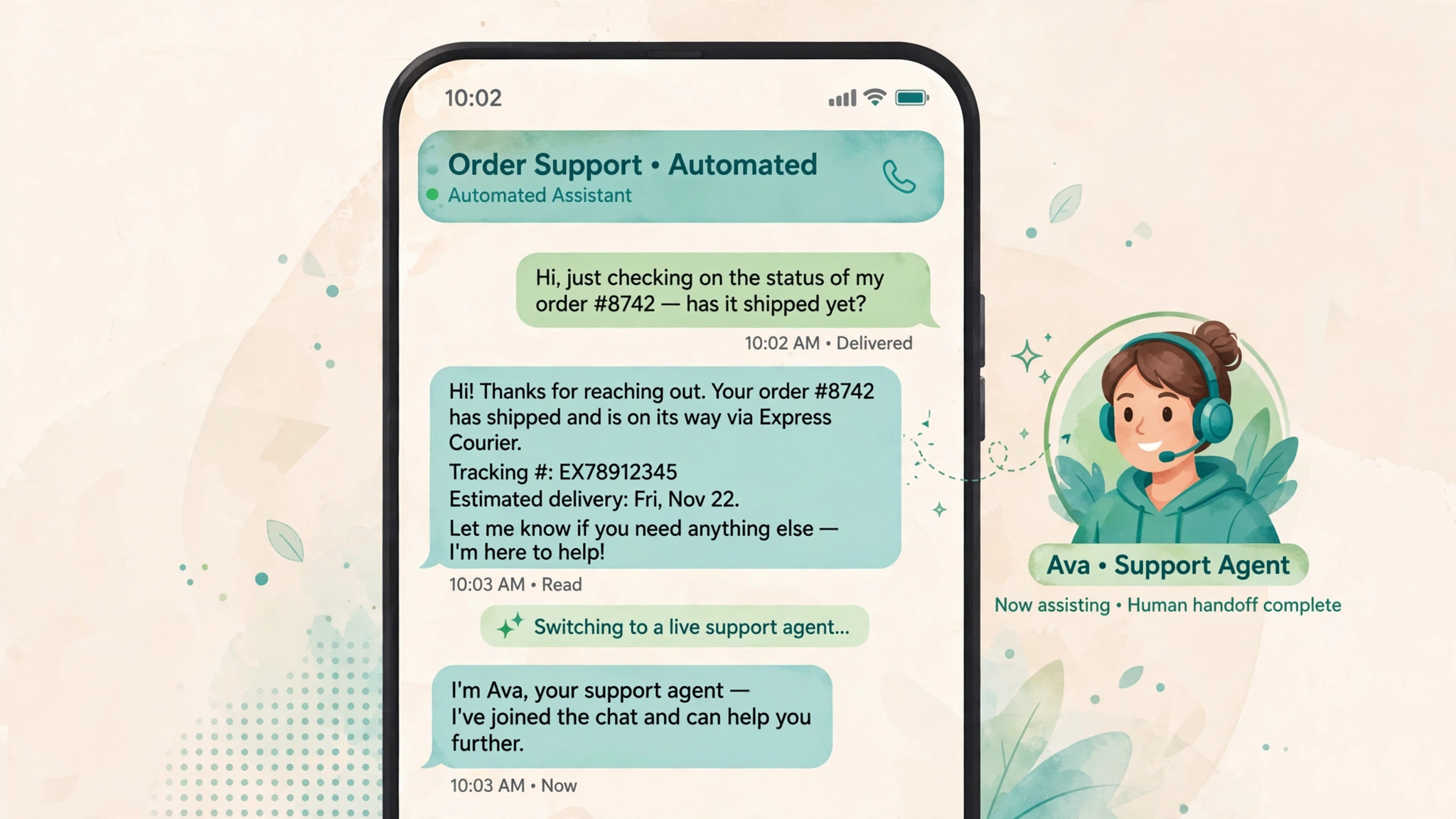
An SMS chatbot for support is software that holds a two-way text conversation with a customer and replies automatically. The customer texts a normal phone number. The bot reads the message, figures out the intent, pulls an answer from your order system or help content, and replies in plain text. When it cannot solve the problem, a person takes over in the same thread.
This is the practical version of the topic: which tickets to hand the bot first, what deflection honestly looks like, and how to design the human handoff that vendor pages gloss over.
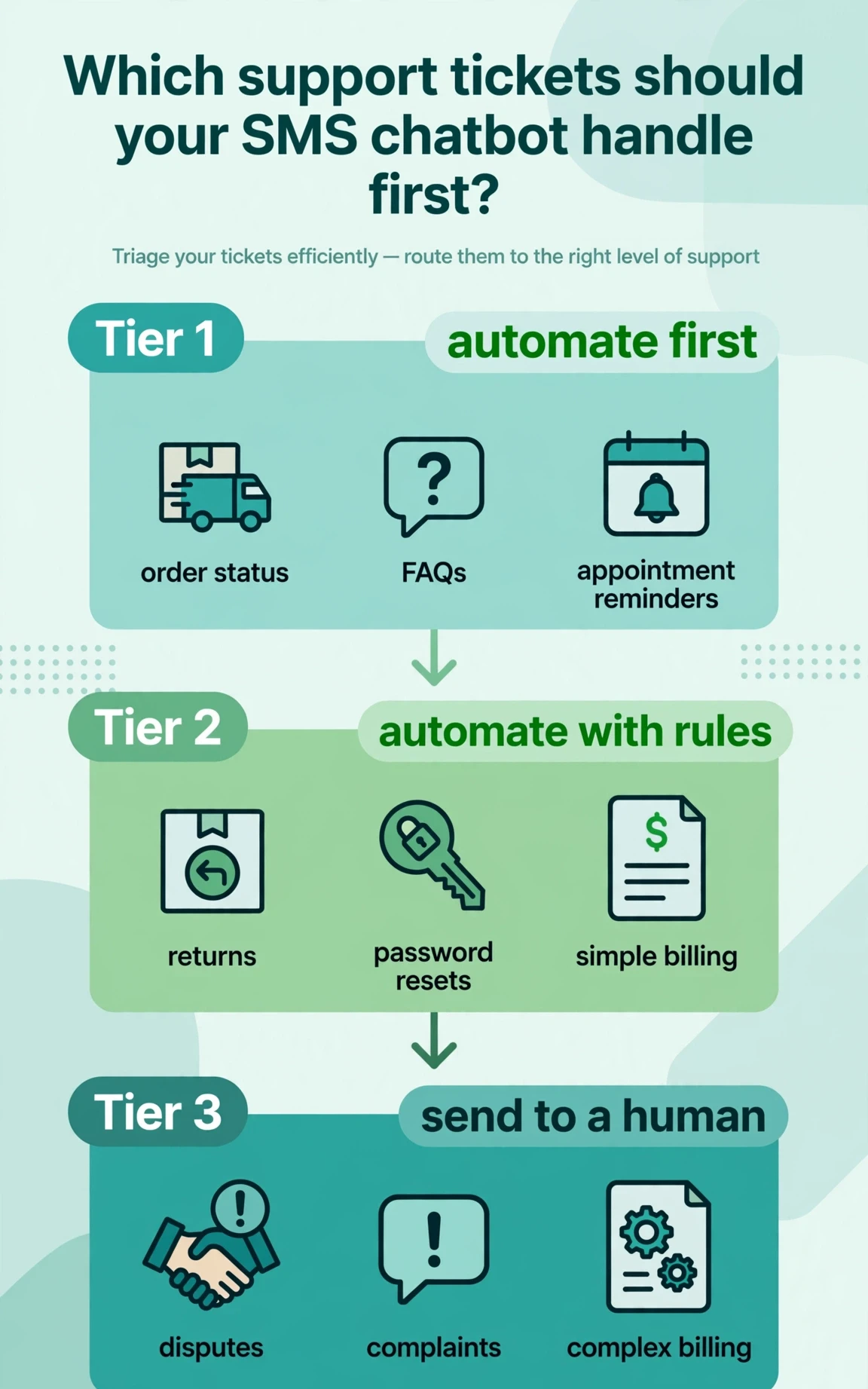
Which Tickets to Automate First
Start with the quiet, boring tickets: the ones that take an agent three minutes each and arrive fifty times a day. Do not start with the loudest complaints.
Start with status questions
“Where is my order?” is the best first ticket to automate. One input, one data source, one correct answer. If the bot is connected to your order data, this resolves without a human almost every time. If it is not connected, do not automate this one yet. A bot that guesses about order status creates more tickets than it prevents.
Automate answers you already wrote down
Store hours, return windows, shipping times, warranty terms, how to cancel. Your help center is a ready-made knowledge base. These questions are worded a dozen different ways, but the answer is one paragraph, and an AI-based bot reads intent instead of matching exact keywords.
Then take the structured workflows
Returns, password resets, and appointment rescheduling are good second-wave tickets. Add guardrails: a return flow should confirm the reason before generating a label, and a password reset should go through email, never credentials over text.
Keep these away from the bot at first
Angry complaints, billing disputes, refund negotiations, anything involving safety or accessibility. These need judgment and tone. The bot can triage them (collect the account detail, name the topic) and hand them to a person with full context. That is still useful automation. It just is not resolution.
A practical rule: if the correct answer lives in a policy document, automate it. If it depends on the customer’s situation or emotions, hand it to a person.
Sample Conversation Flows
Concrete examples help more than descriptions. Here are four realistic flows. Keep bot replies short: nobody reads a paragraph on their phone.
Order status
Customer: “where is my order??”
Bot: “I can check that. What is your order number?”
Customer: “88214”
Bot: “Order 88214 shipped Tuesday and is with the carrier. It should arrive Thursday by 8pm. Reply TRACK for the tracking link, or AGENT if you need a person.”
The bot names what it found, gives the expected arrival, and offers both a next step and an exit to a human.
Returns
Customer: “i want to return the lamp”
Bot: “No problem. Is it damaged, or did you change your mind? Reply DAMAGED or CHANGED MY MIND.”
Customer: “DAMAGED”
Bot: “Sorry about that. Your return label is ready at example.com/r/88214. Print it and stick it on the box. Your refund starts as soon as the carrier scans it.”
Structured choices work better over text than open questions. They keep the customer typing one or two words.
Password reset
Customer: “i forgot my password”
Bot: “I just sent a reset link to the email on your account. It expires in 30 minutes. Reply DONE once you set a new password, or AGENT if the email never arrives.”
Never send or ask for passwords over SMS. The bot triggers the reset and email does the verification. If the email never arrives, that is a person-sized problem.
Billing question
Customer: “why did you charge me twice”
Bot: “Let me look. I see two charges on March 3: one for the March plan and one for a storage add-on. Is one of these the duplicate? Reply MARCH, ADDON, or NEITHER.”
Customer: “NEITHER”
Bot: “Got it. This needs a closer look, so I am bringing in a person. An agent will text you here within 15 minutes with both charges pulled up. You do not need to repeat anything.”
The bot attempted a real diagnosis with actual data, then exited cleanly when the answer was not one of the expected options.
What Realistic Deflection Looks Like
Vendor pages love to quote deflection numbers. Treat every one of them as marketing until you have your own data.
Status lookups connected to live data resolve at a high rate. The input is structured and the answer comes from a system, not from judgment. FAQ questions resolve well as long as the help content is accurate and current. The bot is only as good as the articles it reads.
Structured workflows like returns sit in the middle. The bot completes them when the customer follows the steps, and hands off instead of looping when the customer types something unexpected. Each handoff is not a failure. It is the design working.
Open-ended problems resolve poorly, and that is fine. The bot’s job there is triage: collect the order number, name the issue, and pass a clean summary to an agent.
Set expectations in tiers, not in one headline number. Track deflection separately for status questions, FAQ answers, and structured workflows. The blended number confuses because the mix of ticket types changes month to month.
Designing the Human Handoff
This is the part vendor pages gloss over, and it is where customer trust is won or lost. Most bad chatbot experiences come from the feeling of being trapped, not from the bot’s knowledge.
Always offer a human, early and often
“Reply AGENT to talk to a person” should appear in the first message, and the keyword should work at any point. Do not bury it in a menu.
Name the person and the wait
When a handoff happens, the bot should say three things: that a person is coming, who that person is, and roughly when. “Maya from our support team will text you here within 15 minutes” beats “transferring you now.”
Pass the full context
The agent who picks up should see the whole conversation, the account or order details, and what the bot already tried. The single worst support experience is repeating your problem to the third person. If your platform cannot show the agent the bot’s transcript, fix that before you launch.
Handle after hours honestly
The bot works at 2am. Your team does not. The handoff message should say so: “Our team is offline until 9am. I will queue this for them and they will reply first thing. If it is urgent, reply URGENT.”
Keep the bot in the loop
The handoff does not have to be all or nothing. A common pattern is the bot handing off, then sending the follow-up survey after the agent closes the ticket. Think of the bot as the agent’s assistant, not just the customer’s first contact.
Compliance and Privacy Notes
Support texts are conversational, but consent and opt-out rules still apply. A customer who texts you first is generally the safest ground, because they started the conversation. Marketing messages sent on the back of a support thread are not. Keep support and marketing separate. Honor opt-outs immediately and everywhere: if someone replies STOP, stop texting them until they opt back in.
Verify identity before sharing account detail. Anyone can text from a phone, so match the order number to the phone on file or send a one-time code to the account email first. Never read out full addresses, payment details, or credentials in a text.
Also watch the clock. Support conversations that stretch into the night can run into quiet-hour rules depending on your state and the type of message. The site’s SMS quiet hours checker can verify a send time in seconds.
This is general information, not legal advice. Texting rules change, enforcement is active, and the details depend on your jurisdiction. Have counsel review your opt-in and opt-out flows before you launch.
How to Measure Whether It Is Working
Review these weekly for the first two months.
Containment by ticket type. How many conversations in each category ended without a human? This is your deflection number, measured honestly and separately per category.
Handoff quality. Sample the handoffs weekly. Did the agent have the full context? Did the customer repeat themselves? Log why each handoff happened, too: wrong answer, customer asked for a human, after hours, edge case. That list is your roadmap. This matters more than the containment number.
Time to resolution. Compare bot-handled, bot-triaged, and human-only tickets. The bot’s value shows up here even when it does not fully resolve the ticket.
Cost per conversation. The bulk SMS cost calculator estimates the messaging side. The bigger number is usually agent time saved, which your time-to-resolution data will show. Resist the urge to game containment by hiding the human exit: a bot with high containment and angry customers is worse than a bot with modest containment and relieved ones.
FAQ
How does an SMS chatbot for customer support work?
A customer texts your business number. The bot reads the message, identifies the intent, and pulls an answer from your order system, help content, or a workflow you designed. For anything it cannot handle, it transfers the conversation to a human agent with the full transcript attached. Customers keep texting the same number either way.
Which support tickets should we automate first?
Order status lookups, help-center FAQs, and appointment reminders. These are high volume and low judgment. Add structured workflows like returns and password resets next. Keep complaints and billing disputes with human agents at first, and let the bot triage those instead of resolving them.
Are SMS chatbots legal for customer support?
Generally yes when you are replying to customers who contacted you. You still need to honor opt-outs immediately, keep support and promotional messages separate, and follow carrier registration and quiet-hour rules. This is not legal advice; have counsel review your setup.
How does the handoff to a human agent work?
The bot transfers the conversation to an agent in the same thread with the full transcript and account context attached. The customer gets a message naming the agent and the expected wait time. Good setups keep the bot in the loop afterward, for example to send the follow-up survey once the ticket closes.
Can an SMS chatbot integrate with our CRM or order system?
That integration is what makes the bot useful instead of decorative. Most platforms connect through APIs to CRMs, help desks, and order management systems so the bot can look up real customer data. Without it, the bot can only answer from static content, which limits it to FAQs.
What should we do when someone texts the wrong number?
Phone numbers get reassigned, so it happens. Build in a verification step before sharing any account detail. If the texter cannot verify, end the conversation politely and flag the number for review.
How do we keep support texts from going out late at night?
Design the bot’s after-hours behavior explicitly: it can still answer at night, but anything queued for a human should wait until morning with a clear message saying so. Check automated send times against state rules with the SMS quiet hours checker before scheduling anything.
Watch how this works in practice. This walkthrough covers the setup step by step:
Conclusion
An SMS chatbot earns its place in customer support by doing the boring work well: instant status answers, accurate FAQ replies, and clean triage for everything else. Start with the tickets that have clear answers, keep a visible exit to a human at every step, and measure handoff quality as carefully as containment.
For more utilities that support a messaging program, from compliance checks to list cleanup, browse the free tools hub.
Want this set up for you?
I build SMS chatbots and API integrations for businesses. If you would like what this guide describes, done for you, get in touch.