A quick note before we start: this guide explains how A2P 10DLC registration works for SMS chatbots, but it is not legal advice. Carrier rules, fees, and approval timelines change regularly, so treat every figure here as a snapshot and re-check your provider’s current documentation before you file.
If your SMS chatbot texts from a regular 10-digit US phone number, it needs to be registered. US carriers require every business sending application-to-person (A2P) messages from a long code to register through The Campaign Registry (TCR), and unregistered traffic gets blocked or filtered. That includes chatbots.
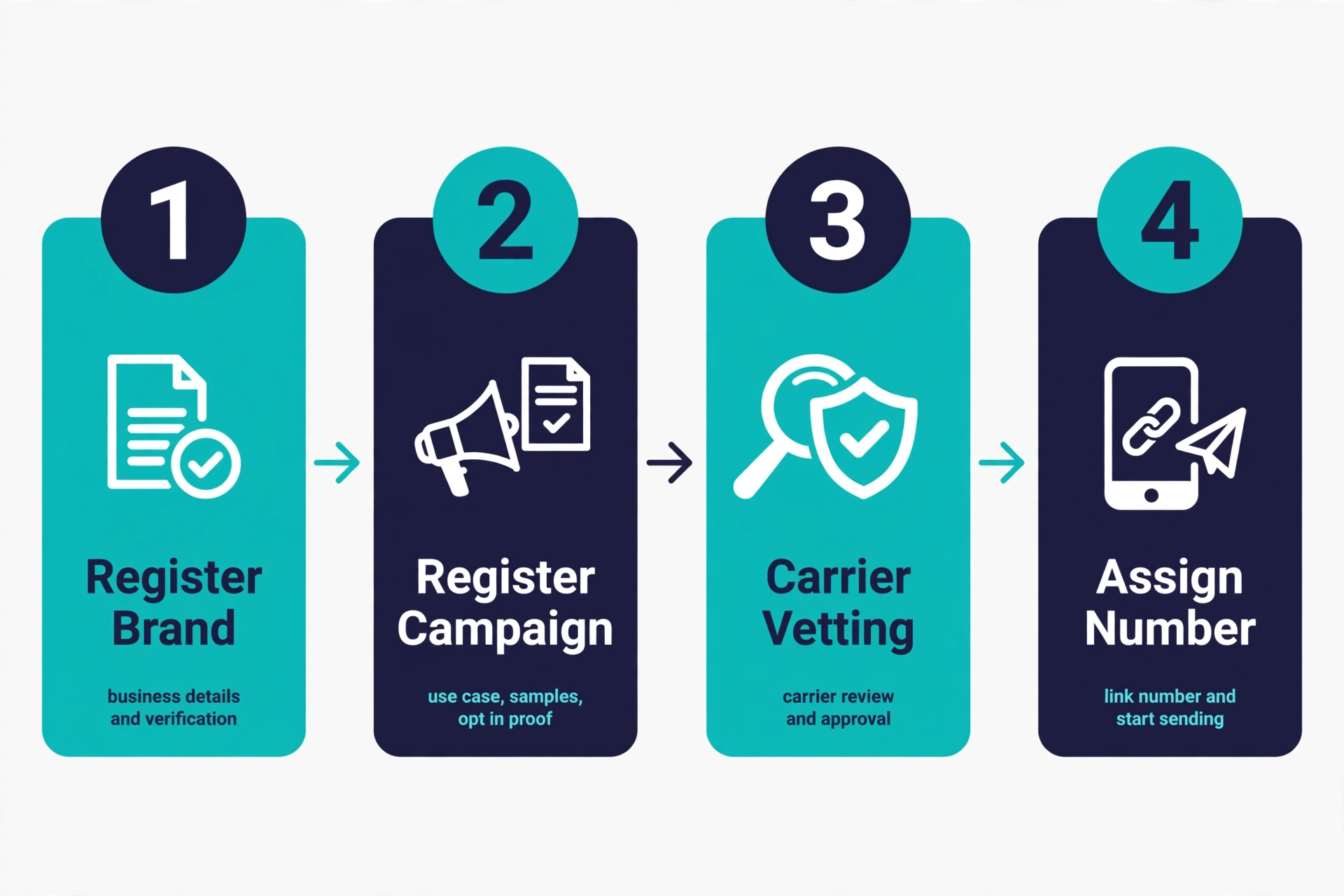
Registration has two parts: your brand (who you are) and your campaign (what you send). This guide maps both to chatbot use cases, shows what sample messages and opt-in proof reviewers expect, and flags the mistakes that get registrations rejected.
What 10DLC registration is and why your chatbot needs it
10DLC means 10-digit long code: a standard US phone number used by an application instead of a person. A2P 10DLC is the system US carriers use to verify those senders. Registration tells carriers the number belongs to a real business, what it will send, and that recipients agreed to receive it. Approved senders get better deliverability, fewer spam-filter hits, and higher throughput.
This matters more for chatbots than for one-off broadcasts. A bot holds conversations: replies, confirmations, follow-ups, maybe after-hours answers. All of that flows through the registered number, so the campaign you file must describe what the bot actually does.
Skipping registration is not a shortcut. Since September 1, 2023, carriers have blocked unregistered +1 10DLC traffic outright rather than just surcharging it. On Twilio this shows up as messages that look sent on your dashboard but never arrive (error 30034).
Step 1: Register your brand
The brand is your business identity as the sender, registered through your messaging provider (Twilio, Plivo, Vonage, Telnyx, Sinch, and others submit to TCR on your behalf). You provide your legal business name, EIN or tax ID, business address, website, and a contact person. TCR checks these against business records, so the name and address must match your official filings exactly. A mismatch with IRS records is a top reason brands get rejected. Three tiers:
- Sole Proprietor. No EIN. About $4.50 one-time, but one campaign, one phone number, and only 2FA, Customer Care, Delivery Notification, and Account Notification use cases.
- Low-Volume Standard. Requires an EIN, costs about the same (around $4.50 one-time). Up to five campaigns and multiple numbers with broader use cases. If you have an EIN, pick this over sole proprietor.
- Standard. About $4.50 one-time for the brand, plus optional standard vetting around $41.50 (roughly $46 all in) that raises your trust score and throughput. Enhanced vetting exists at higher tiers; confirm the current fee on Twilio’s pricing page before budgeting, since published figures change. Up to five campaigns, full use cases, higher volumes.
Brand approval is usually fast: often minutes to a day, though secondary vetting can take up to a week. Finish verification steps quickly, since an unverified brand blocks everything downstream.
Step 2: Register your campaign
The campaign describes your messaging program: what you send, to whom, and why. Each distinct use case needs its own campaign. You submit a use case selection, a written description, sample messages, your opt-in method and proof, opt-out and help language, and your privacy policy and terms links.
Campaign vetting costs around $15 per campaign one-time, plus a monthly fee by use case (about $1.50 for low-volume mixed up to $10 for most standard use cases). A 48-hour expedited review is sometimes available for around $50. Timelines vary: some providers average a few business days, Twilio’s current campaign vetting FAQ cites up to five business days, and rejected submissions can stretch into weeks. File early. Once approved, assign your number to the campaign and start sending.
Mapping campaign use cases to chatbot behavior
The use case you select has to describe the bulk of what your bot actually sends. Pick wrong and you invite rejection or post-approval filtering. Two TCR use cases cover nearly every chatbot.
Customer Care: the conversational two-way bot. Two-way messages that provide support, answer questions, or resolve issues. Support bots, lead-qualification bots, missed-call text-back responders, and FAQ bots fit here. Samples should show both sides: the inbound message and the bot’s replies.
Account Notification: the alert and reminder bot. Informational messages tied to an existing relationship: appointment reminders, order updates, payment confirmations, service alerts. If your bot mostly pushes updates with light reply handling, register here.
Mixed or Low-Volume Mixed: the bot that does several jobs. A bot that books appointments, sends reminders, and answers questions is doing Customer Care plus Account Notification. A Mixed campaign combines two to five standard use cases in one registration. Low-Volume Mixed is the budget version: lower monthly fees, capped throughput (around 2,000 messages per day and 75 per minute). Include samples for each use case you select.
Marketing: only if the bot sends promotions. Offers or sales announcements belong under Marketing, which requires explicit opt-in consent. A support bot that occasionally drops a promo is mixing use cases, a classic reason for post-approval filtering. Register a separate Marketing campaign instead.
Describe the bot honestly and pick the use case matching most of its traffic. Reviewers have no context about your business, so the description and samples must speak for themselves.
What sample messages reviewers expect
Sample messages get the closest scrutiny. They must look like real messages a subscriber would receive, with concrete details instead of placeholders. They must include your brand name and opt-out language such as “Reply STOP to stop,” and match the declared use case.
A weak submission:
Your appointment is in 3 days.
It fails on brand name and opt-out instructions.
A submission that passes:
Hi Maria, this is Bright Dental. Your visit is scheduled for October 2 at 9:00 a.m. Reply C to confirm or call (555) 014-2233 to reschedule. Reply STOP to stop.
For a Customer Care bot, show the bot’s side of a real exchange:
Bright Dental: Thanks for reaching out. Are you looking to book, reschedule, or ask about a treatment? Reply 1 Book, 2 Reschedule, 3 Question. Reply STOP to stop.
For a Mixed campaign, include samples for each selected use case. For Marketing, expect at least two promotional samples, every one with opt-out language. Never paste templates with placeholders like {order_id} as samples. Use realistic example values.
What opt-in proof reviewers expect
Reviewers check that your consent story is concrete. “Users opt in on our website” is too vague to pass.
Describe the message flow. Spell out the exact path from first contact to first message: “Customers enter their phone number in the booking form on our website, check a box agreeing to receive appointment reminders and service messages by text, and click Submit. They then receive a confirmation text.” The flow must match what is actually live on your site.
Write a compliant opt-in confirmation. The first text should identify the brand, set frequency expectations, and give HELP and STOP instructions:
Bright Dental: You’re signed up for appointment reminders. Msg frequency varies. Msg & data rates may apply. Reply HELP for help, STOP to stop.
Publish your privacy policy and terms. You will submit links to both. The policy should state that mobile numbers are not shared with third parties for marketing. A missing page, a broken link, or a policy that contradicts your opt-in flow will stall the application. Some providers also ask for a screenshot of the opt-in form showing the brand name, consent language, and STOP and HELP disclosures, so keep one on hand.
Related note: marketing texts need express written consent under the TCPA, and quiet hours apply: no marketing sends before 8 a.m. or after 9 p.m. in the recipient’s local time, with several states setting stricter windows. See our quiet hours by state guide and the quiet hours checker.
Common rejection reasons and how to avoid them
- Brand details do not match official records. Copy the legal name and address exactly from your tax documents.
- Vague use case description. “We text our clients” gets rejected. Say what the bot sends, to whom, and how often, with a frequency disclosure like “messaging frequency varies.”
- Samples missing brand name or opt-out language. The most common sample failure. Put both in every sample.
- Samples do not match the declared use case. Promotional language inside a Customer Care campaign, for example. Align every sample with the use case, or change the use case.
- Weak or missing opt-in proof. No clear message flow, no published privacy policy, or a policy link that 404s. Document the flow, publish the policies, and test every link.
- Placeholder samples or emojis. Use concrete example values and keep samples plain text.
If a campaign is rejected, edit the affected section and resubmit. Do not delete it and start over unless your provider tells you to.
Practical checklist before you submit
- Legal business name and address match your tax documents exactly.
- Website is live on your own domain, with the opt-in form visible and working.
- Privacy policy and terms are published, linked, and consistent with your opt-in flow. The policy states mobile numbers are not shared with third parties for marketing.
- Use case matches the majority of the bot’s traffic. Mixed selected if the bot does multiple jobs.
- Campaign description is specific: what the bot sends, to whom, how often, with frequency disclosure.
- Required sample messages, each with brand name, concrete details, and “Reply STOP to stop.” One per use case for Mixed.
- Opt-in confirmation drafted with brand name, frequency, rates disclosure, and HELP/STOP.
- HELP, STOP/UNSTOP, and keyword responses configured and verified.
- Screenshot of the opt-in form saved, showing brand name and disclosures.
- Budget confirmed: brand fee, campaign vetting fee, monthly campaign fee, and per-message surcharges.
FAQ
Does my chatbot really need 10DLC registration?
If it sends automated texts from a 10-digit US number to US mobile phones, yes. Carriers treat chatbot traffic as application-to-person messaging no matter how conversational it feels.
How long does it take?
Brand approval is often minutes to a couple of days, unless secondary vetting is triggered (up to about a week). Campaign vetting commonly takes a few business days to a couple of weeks.
What does it cost?
About $4.50 one-time for brand registration (all tiers), about $15 one-time campaign vetting per campaign, and roughly $1.50 to $10 per month per campaign by use case (sole proprietor campaigns run about $2 per month), plus per-message carrier surcharges.
One campaign or several?
Each distinct use case needs its own campaign or a Mixed campaign covering them. Keep promos in a separate Marketing campaign.
Can I use my existing business number?
If it is a standard 10-digit US number, usually yes. Check with your Campaign Service Provider first.
What happens if I skip registration?
Messages get filtered or blocked, often silently, and you pay higher carrier surcharges on unregistered traffic.
Is toll-free simpler?
Toll-free numbers use a separate verification process rather than 10DLC registration. The trade-off is different throughput and usually higher per-message rates.
Watch how this works in practice. This walkthrough covers the setup step by step:
Conclusion
10DLC registration for an SMS chatbot comes down to two filings done well: a brand that matches your official business records, and a campaign that honestly describes what your bot sends. Pick the use case that fits the bot’s real behavior, write sample messages that look like actual texts with your brand name and opt-out language, and document your opt-in flow with published policies to back it up.
If you are still designing the bot, start with the companion guides in this series: “SMS Chatbots for Customer Support” and “AI Appointment Reminder Texts” show what Customer Care and Account Notification bots look like in practice, and “Two-Way SMS for Speed to Lead” covers the conversational patterns behind the Customer Care use case. (Suggested link targets are in this article’s frontmatter.)
Want this set up for you?
I build SMS chatbots and API integrations for businesses. If you would like what this guide describes, done for you, get in touch.